
Qwen3.8-Flash-Next on a Mac Studio M5 Ultra: 100 Tokens/sec with llama.cpp
Nov 11, 2026 · Reclaimed Node · 9 min read
The short version
Qwen3.8-Flash-Next is a 125B mixture-of-experts model that uses only about 6B parameters per token, and a 256 GB Mac Studio M5 Ultra runs it well. With llama.cpp and the model's own multi-token prediction (MTP) head, one user gets 83 to 100 tokens/sec, and prompts are read at about 1,950 tokens/sec, so a 16K prompt starts answering in 7.5 seconds.
On the same Mac, that is about twice the speed of DeepSeek V4.1 Flash for one user, and 2 to 3.5 times the total output with several users. With 8 users and 4K or 16K prompts, the Mac running Qwen comes within reach of four CMP 170HX cards running DeepSeek, and gets the first word out just as fast.
Credit where it is due
This setup follows a write-up on r/llamacpp, Qwen3.8-Flash-Next (125B) at ~100 tok/s on an M5 Ultra Mac Studio with llama.cpp, which showed the settings that matter: the MTP draft head, short drafts, and 4,096-token prompt batches. We reused its download and checking steps, then ran our own benchmark with 8 users at once.
Why this model
Our DeepSeek V4.1 Flash Head to Head: 4x CMP 170HX vs Mac Studio M5 Ultra post found the Mac's limits with DeepSeek V4.1 Flash: a 2-bit build was the only one that fit, and it used about 16B parameters per token. Qwen3.8-Flash-Next is the opposite case. It fits at 4-bit with room to spare, and with about 6B parameters per token, each answer needs far less memory traffic, which is what decides speed on a Mac.
These are different models, so this is not a quality comparison. It shows how fast the same Mac can serve a model that suits it, beside one that barely fits.
Setup
| This run | |
|---|---|
| Machine | Mac Studio M5 Ultra, 256 GB unified memory, macOS 27.2.1, GPU memory limit 240,000 MB |
| Engine | llama-server, llama.cpp build b12246 (Unsloth's fork, commit 7a901e9), the same binary as our DeepSeek DSpark run |
| Model files | ggml-org/Qwen3.8-Flash-Next-GGUF: IQ4_NL (95 GiB in two files), MTP head Q8_0 (3.9 GiB), vision projector Q8_0 (0.6 GiB) |
| Speculative decoding | MTP draft head, up to 3 draft tokens, greedy drafting |
| Requests at once | 8 |
| Context | 262,144 tokens, one shared pool for all 8 requests |
| Prompt batch | 4,096 tokens (-b 4096 -ub 4096) |
| KV cache | F16 (the default) |
| n-gram table | 26.8 GiB, read from the SSD on demand |
Test settings, the same as our DeepSeek runs: LLM-Super-Bench from a second Mac on the network, thinking off, temperature 0, replies capped at 512 tokens, prompts from Mill's On Liberty tagged so no cache could help. Prompt sizes were short (about 57 tokens), 4K and 16K, with 1, 2, 4 and 8 users and 3 runs each: 36 races, none failed.
How we set it up
1. Check that your llama.cpp knows the model
Qwen3.8-Flash-Next uses a new architecture called qwen4exp. If your llama.cpp source does not contain that name, your build cannot load it:
grep -n qwen4exp src/llama-arch.cpp # no hit = build a newer llama.cpp
2. Download with aria2c, then check every file
We used the Reddit post's method: aria2c with resuming turned on. It pulled the 99 GiB in about 7 minutes over our connection. One catch the post does not mention: without -o, aria2c saved each file under the download server's internal hash name instead of its real name, so give it the name yourself:
REPO=ggml-org/Qwen3.8-Flash-Next-GGUF
for f in Qwen3.8-Flash-Next-IQ4_NL-00001-of-00002.gguf \
         Qwen3.8-Flash-Next-IQ4_NL-00002-of-00002.gguf \
         mtp-Qwen3.8-Flash-Next-Q8_0.gguf mmproj-Qwen3.8-Flash-Next-Q8_0.gguf; do
  caffeinate -i aria2c -o "$f" -c -x 16 -s 16 -k 16M --file-allocation=none \
    --max-tries=0 --retry-wait=5 "https://huggingface.co/$REPO/resolve/main/$f"
done
aria2c does not check what it downloaded. Each file's SHA-256 is listed as lfs.oid in https://huggingface.co/api/models/ggml-org/Qwen3.8-Flash-Next-GGUF/tree/main; compare it with openssl dgst -sha256 on each file. All four matched.
3. Start the server
llama-server \
  -m Qwen3.8-Flash-Next-IQ4_NL-00001-of-00002.gguf \
  --mmproj mmproj-Qwen3.8-Flash-Next-Q8_0.gguf \
  --model-draft mtp-Qwen3.8-Flash-Next-Q8_0.gguf \
  --spec-type draft-mtp --spec-draft-n-max 3 \
  --parallel 8 --kv-unified -c 262144 \
  -b 4096 -ub 4096 \
  --gpu-layers all --flash-attn on --no-context-shift --jinja \
  --temp 1.0 --top-p 0.95 --top-k 20 --min-p 0.0 \
  --host 0.0.0.0 --port 8001
Three settings matter most. --spec-draft-n-max 3 keeps drafts short: the Reddit post found longer greedy drafts slower. -b 4096 -ub 4096 reads prompts in bigger batches. And --min-p 0.0 must be set by hand, because the model file sets the other sampling values but not this one, and llama.cpp would otherwise use 0.05. The server loaded in about 25 seconds.
4. Check that thinking can be turned off
The model's chat template thinks at length by default. Our benchmark sends chat_template_kwargs: {"enable_thinking": false} with each request, and every test answer came back with no reasoning text, so no other setting was needed.
Memory
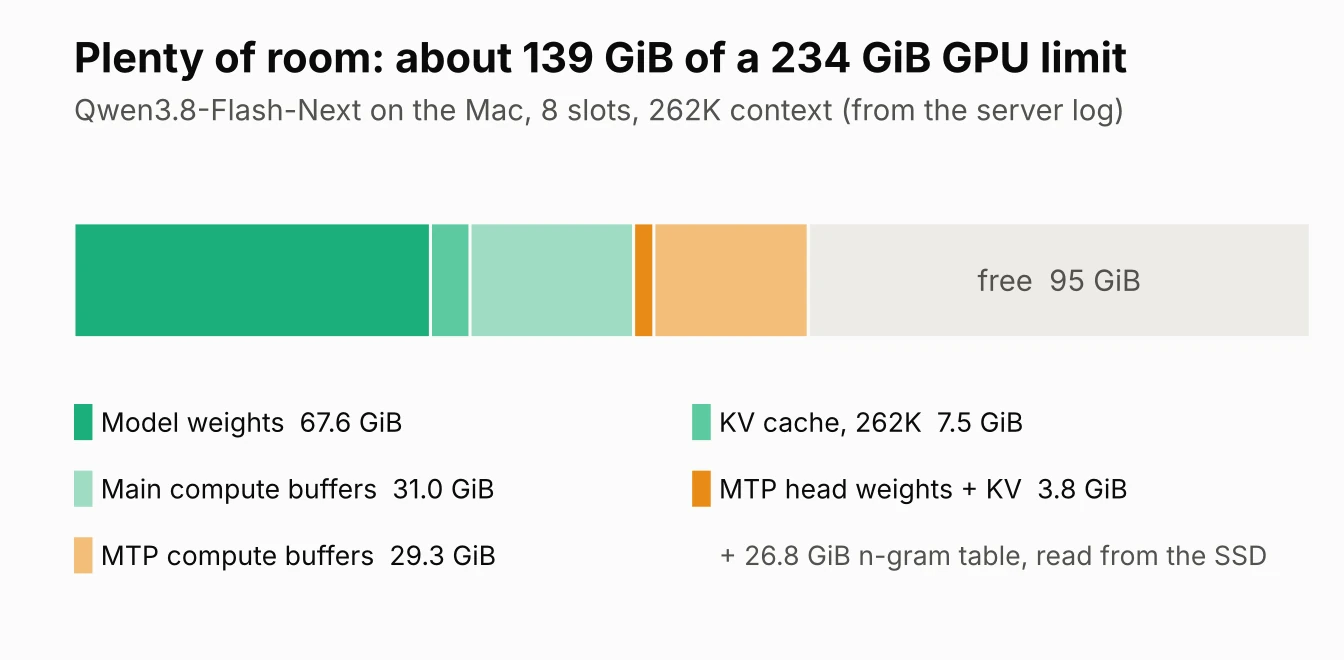
The whole setup uses about 139 GiB of the 234 GiB the GPU may take, leaving 95 GiB free. The weights are only 67.6 GiB; the large compute buffers come from 4,096-token batches times 8 requests at once. A single-user setup needs far less. The 26.8 GiB n-gram table is only looked up, never multiplied, so llama.cpp leaves it on the SSD and reads rows as needed.
Single-user speed
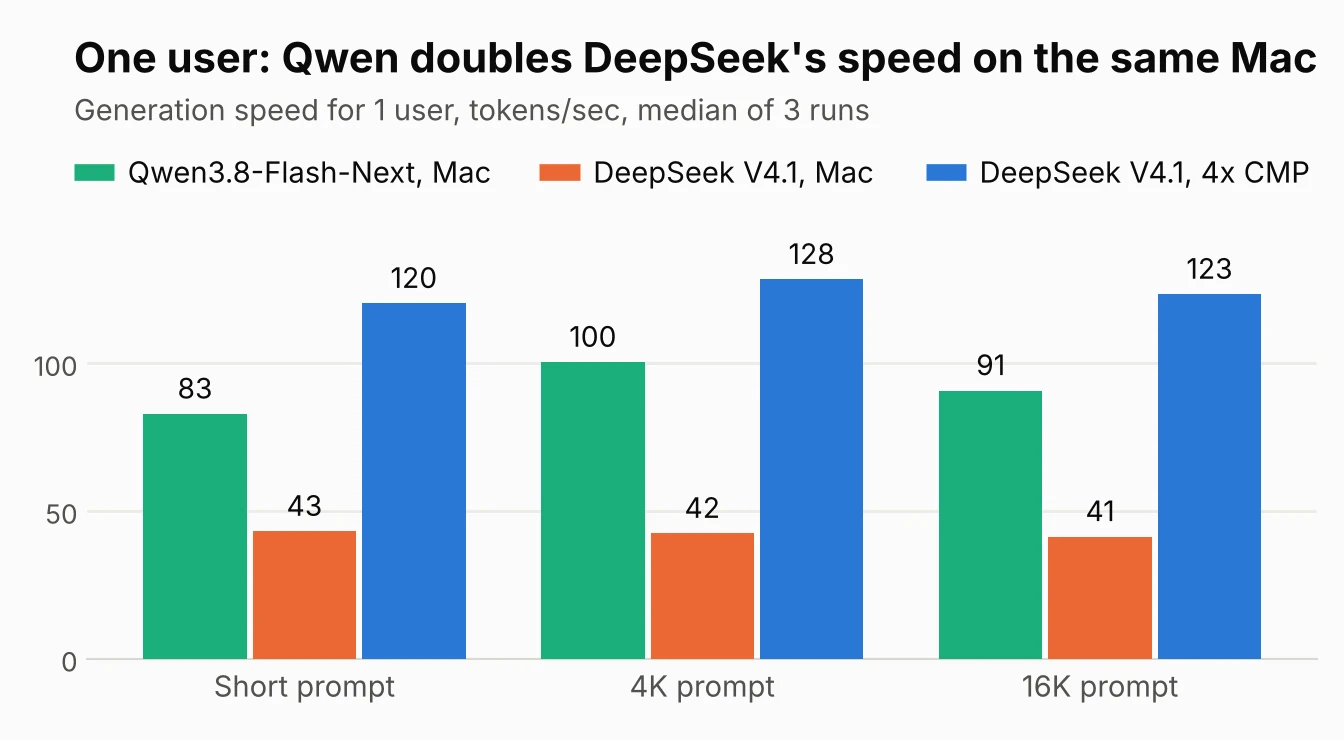
One user gets 83 tokens/sec with short prompts, 100 at 4K and 91 at 16K. Short prompts come out a little slower because their answers are short and MTP drafting has less to work with. The MTP head's drafts were accepted 61 to 66% of the time, so each step produced about 2.9 tokens instead of 1. DeepSeek on the same Mac managed 41 to 43, and on the CMP box 120 to 128.
Prompt reading
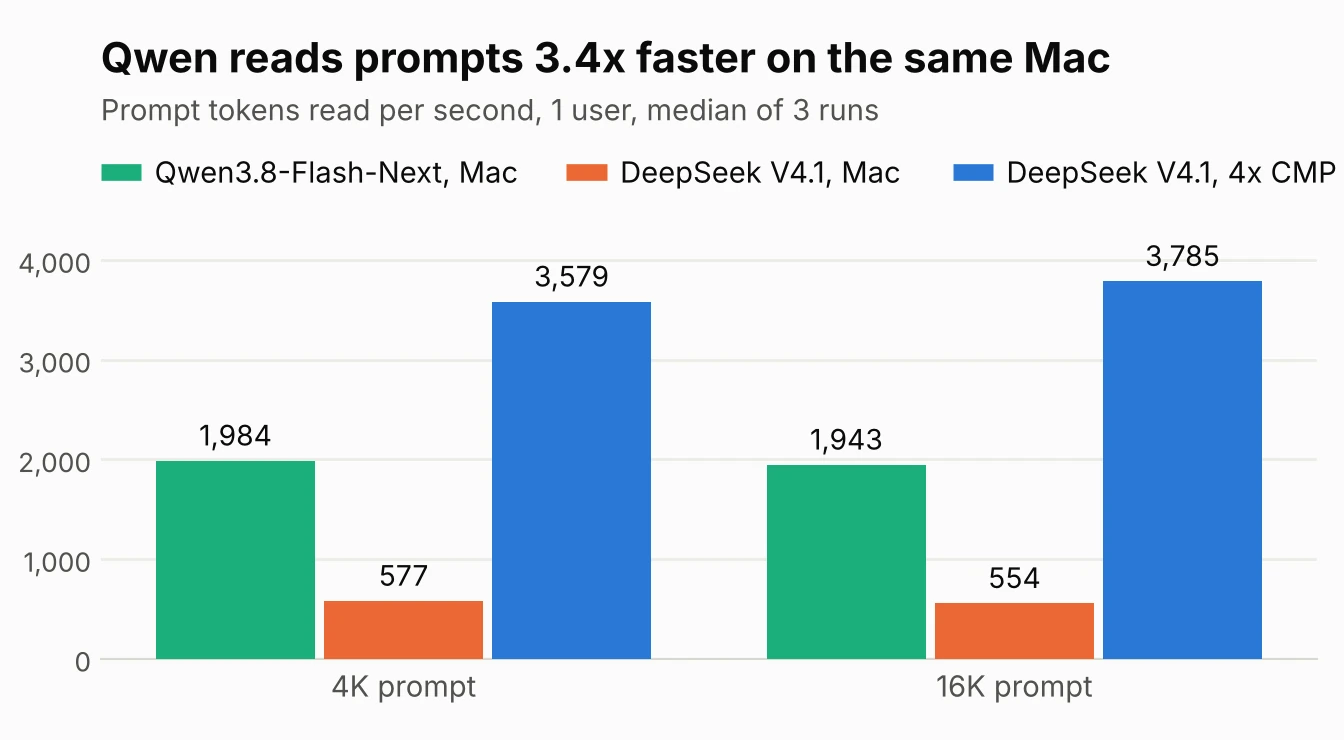
The Mac reads Qwen prompts 3.4 times as fast as DeepSeek prompts. Part of that is the smaller model and part is the bigger prompt batch: Qwen ran with 4,096-token batches, DeepSeek with 512 to match the CMP box. The CMP box still reads DeepSeek prompts about twice as fast as the Mac reads Qwen.
| Measure | Qwen, Mac | DeepSeek, Mac | DeepSeek, 4x CMP |
|---|---|---|---|
| First word, 1 user, short prompt | 0.20 s | 0.40 s | 0.16 s |
| First word, 1 user, 4K prompt | 1.8 s | 6.2 s | 1.0 s |
| First word, 1 user, 16K prompt | 7.5 s | 26.1 s | 3.8 s |
| First word, 8 users, 4K prompts | 11.8 s | 37.1 s | 11.1 s |
| First word, 8 users, 16K prompts | 40.6 s | 132.9 s | 43.0 s |
Several users at once
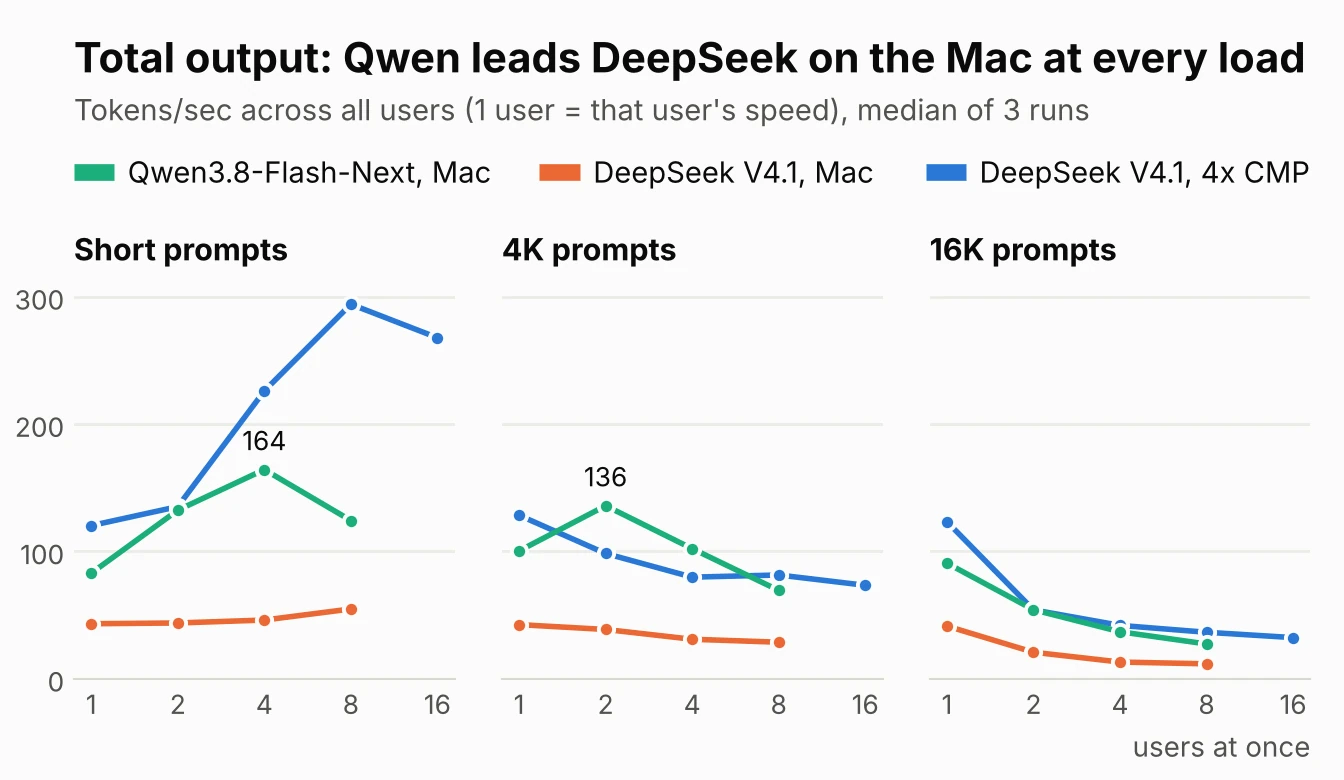
| Total tokens/sec | Qwen, Mac | DeepSeek, Mac | DeepSeek, 4x CMP |
|---|---|---|---|
| Short prompts, 4 users | 164 | 46 | 226 |
| Short prompts, 8 users | 124 | 55 | 294 |
| 4K prompts, 2 users | 136 | 39 | 98 |
| 4K prompts, 8 users | 69 | 29 | 81 |
| 16K prompts, 8 users | 27 | 12 | 36 |
With short prompts, Qwen's total climbs to 164 tokens/sec at 4 users, then drops to 124 at 8. Each step checks up to 4 tokens per user (3 drafts plus 1), so 8 users means 32 tokens a step, and the drafting starts to cost more than it saves. With 4K prompts, 2 users get 136 tokens/sec in total, more than the CMP box's 98 for DeepSeek. With long prompts and many users, every setup spends most of its time reading prompts, and the totals converge.
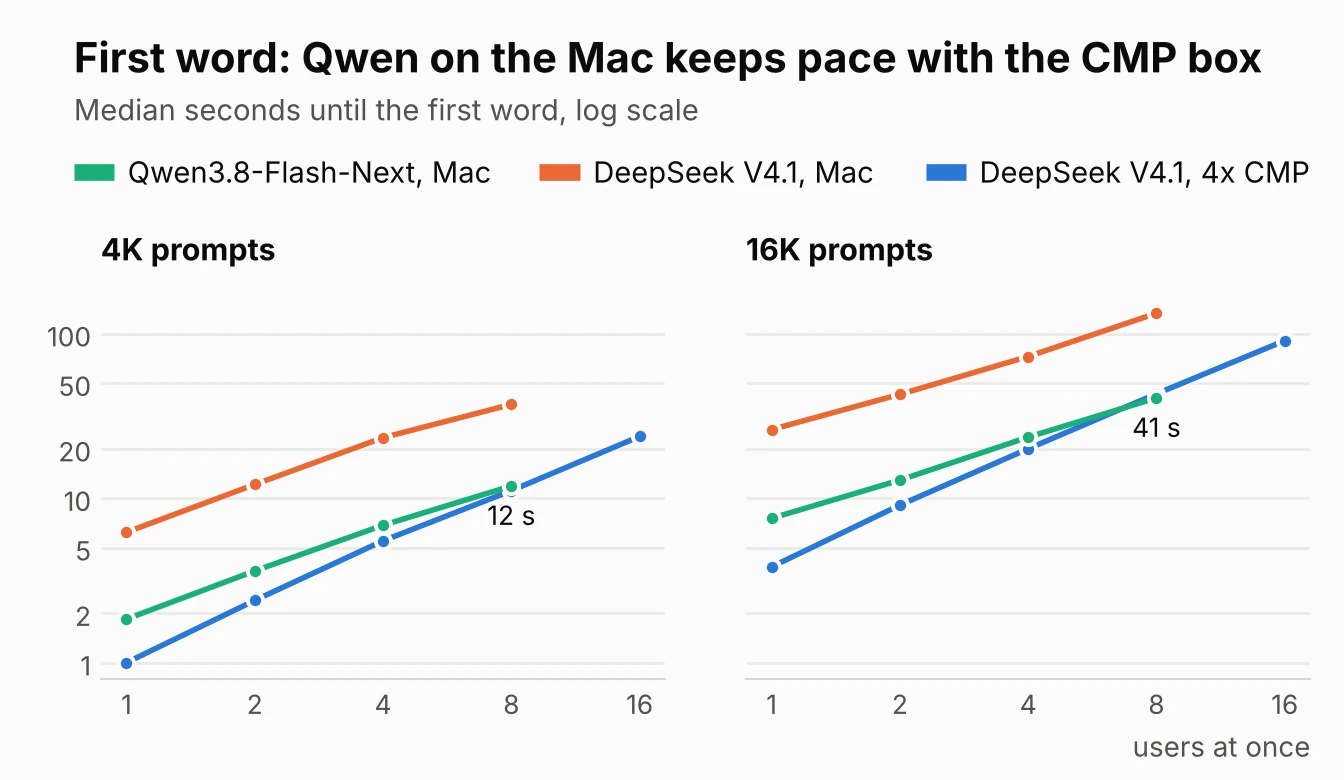
Waiting for the first word tells the same story. With 8 users, the Mac running Qwen starts answering a 4K prompt in 11.8 seconds against the CMP box's 11.1 for DeepSeek, and a 16K prompt in 40.6 seconds against 43.0.
Against the Reddit numbers
| Reddit post | This run | |
|---|---|---|
| llama.cpp | b11538, upstream | b12246, Unsloth's fork |
| Requests at once | 1 | 8 |
| Sampling | temperature 1.0 | temperature 0 |
| MTP, greedy, up to 3 drafts | 87.0 tokens/sec | 83 short, 100 at 4K, 91 at 16K |
| MTP, probabilistic, up to 5 drafts | 100.2 tokens/sec | not tested |
| Prompt reading, 4K, 4,096 batch | 2,150 tokens/sec (llama-bench) | 1,984 tokens/sec (end to end) |
The numbers line up. Our greedy MTP results land around the post's 87 to 100, and our prompt reading is within 8% of its llama-bench figure, which measures the engine alone rather than a full request. Probabilistic drafting matters when you sample above temperature 0; our benchmark uses temperature 0, where greedy drafting is the natural choice.
What this shows, and what it does not
- The model matters as much as the machine. The same Mac, engine and settings run Qwen3.8-Flash-Next about twice as fast as DeepSeek V4.1 Flash, because it uses far fewer parameters per token and fits at 4-bit.
- A Mac can keep up under load with the right model. With 8 users and 4K or 16K prompts, the Mac running Qwen nearly matches four CMP 170HX cards running DeepSeek. With short prompts, the CMP box still pulls well ahead.
- Speed only. We did not test answer quality. The two models score differently on public benchmarks, and this is a 4-bit build.
- One setting each. MTP ran with up to 3 greedy drafts throughout, and the prompt batch differs from our DeepSeek runs (4,096 against 512).
Next
- Draft length under load. Rerun 8 users with up to 2 drafts and with MTP off, to see whether the short-prompt drop at 8 users goes away.
- Same model on the CMP box. Qwen3.8-Flash-Next in vLLM on the four CMP 170HX cards, for a true same-model head to head.
- Another engine on the Mac. TensorFold and MLX-based servers report fast Qwen numbers on Apple Silicon; an A/B on this Mac with the same races would show whether they beat llama.cpp with 8 users.
- Quality. The quality tests from our CMP posts, run on this setup.
Related: DeepSeek V4.1 Flash Head to Head: 4x CMP 170HX vs Mac Studio M5 Ultra · DeepSeek V4.1 Flash on a Mac Studio: DSpark at 8 Users and a One-Line llama.cpp Fix · DeepSeek V4.1 Flash on 4x CMP 170HX: Benchmark Results · Race Your Local AI Machines and Trust the Numbers: LLM-Super-Bench · the r/llamacpp write-up this setup follows