
Race Your Local AI Machines and Trust the Numbers
Oct 23, 2026 · Reclaimed Node · 6 min read
Which of your AI machines is faster? Send the same prompt to both at the same instant and watch. LLM-Super-Bench is a free, open-source tool that races local language-model servers side by side, times them honestly, and turns the results into charts you can share.
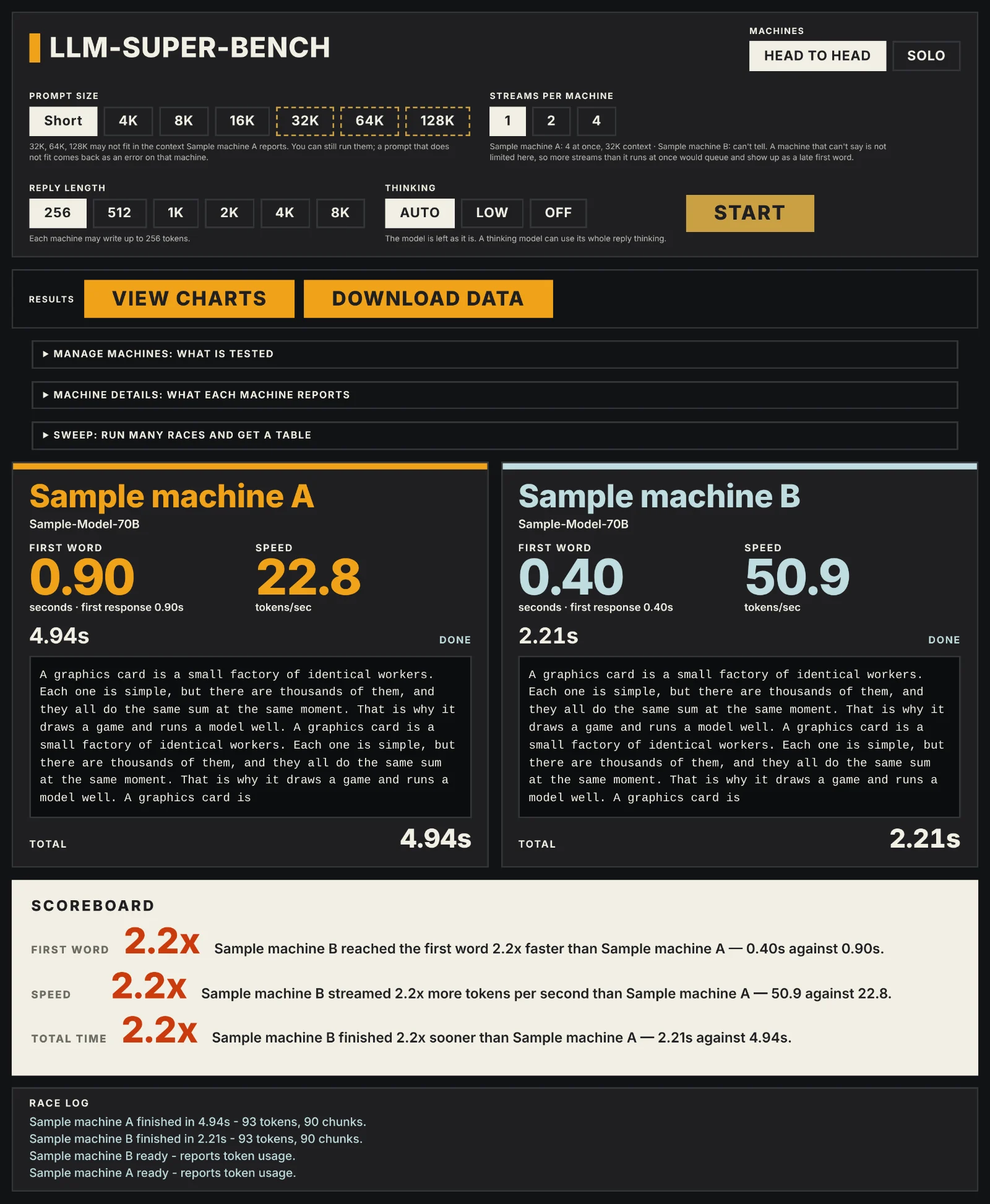
If you run local AI at home or in a small lab, you have probably asked the question. A Mac Studio, a GPU box in the rack, a pair of used mining cards: which one answers faster, and by how much? Most of us answer with a number from a terminal, copied from a run last week, on a different prompt, with a different setting. LLM-Super-Bench replaces that with one button.
It runs on any computer with Bun installed, needs no other software, and talks to the machines you already have.
Why a single tokens-per-second number misleads
Speed claims fall apart because the conditions differ, not because anyone is lying. LLM-Super-Bench is built around removing those differences, and it says so on the scoreboard when it cannot.
- Same instant. Every request, to every machine, is sent in one step with nothing awaited in between, so no machine gets a head start.
- No prompt-cache head start. Each race begins with a unique run id as the first line of the prompt, so a server's prompt cache cannot hand one machine a free first word. If a server still reports reused tokens, the scoreboard calls it out.
- A real first word. Some servers send an empty chunk immediately. That is a response, not a word, so the clock stops at the first streamed text.
- Tokens only when they are real. Speed is in tokens per second only when every machine reports token counts. If one does not, all machines are shown in streamed chunks, with a note.
- Queues are named. Ask a machine for more streams than it runs at once and the extra ones wait in line. The scoreboard says how many waited, because that wait is inside its first-word time.
- The setup travels with the number. Model file, quantization, server build, slots and context are read from each machine and saved with the results, and the page lists where two machines differ.
The point is a number you can defend when someone asks how you measured it.
What you can race
- Head to head or solo. Pick two machines and watch them stream the same reply side by side, or run one machine on its own. With more than two saved, buttons under Machines choose which two race, and the page remembers the pick.
- Prompt sizes from a sentence to 128K tokens. Short prompts test speed; long ones test how fast a machine reads before it starts to answer.
- Many streams at once. Fire several requests per machine to see how it behaves under load. The page limits the choices to what each machine says it can run at once.
- Sweeps. Pick several prompt sizes and stream counts and let the tool run the whole grid, repeating each cell and reporting the median with the lowest and highest run. A sweep can also run from the command line, so it can run overnight with no browser open.
- Thinking models. Reasoning models spend tokens thinking before they answer, which can eat a short reply limit. Reply length and thinking (auto, low, off) are controls on the page, and the page warns when a machine produced only thinking.
- Fair sampling. Every request carries the same temperature, 0 by default, which is the fair setting for a speed race. top_p and top_k can be set too, and the page warns when machines would fall back to their own defaults. The sampling is saved with every result.
- Many engines, not just one. Anything with an OpenAI-compatible streaming endpoint can be raced. The details panel recognises llama.cpp, vLLM, MLX, mlx-vlm, mlx-lm, Ollama, LM Studio, SGLang, KoboldCpp, TGI, TensorRT-LLM, Strata, and you can name any other engine by hand.
- Answer quality, not just speed.
bun run qualityasks every machine the questions of a published test and scores the answers with code, not another model: IFEval for following instructions, MMLU-Pro and MMLU for knowledge, GSM8K and MATH-500 for maths, and a long-context test for finding facts in 4K to 128K tokens. Replies cut off by the reply limit or made only of thinking are counted separately.
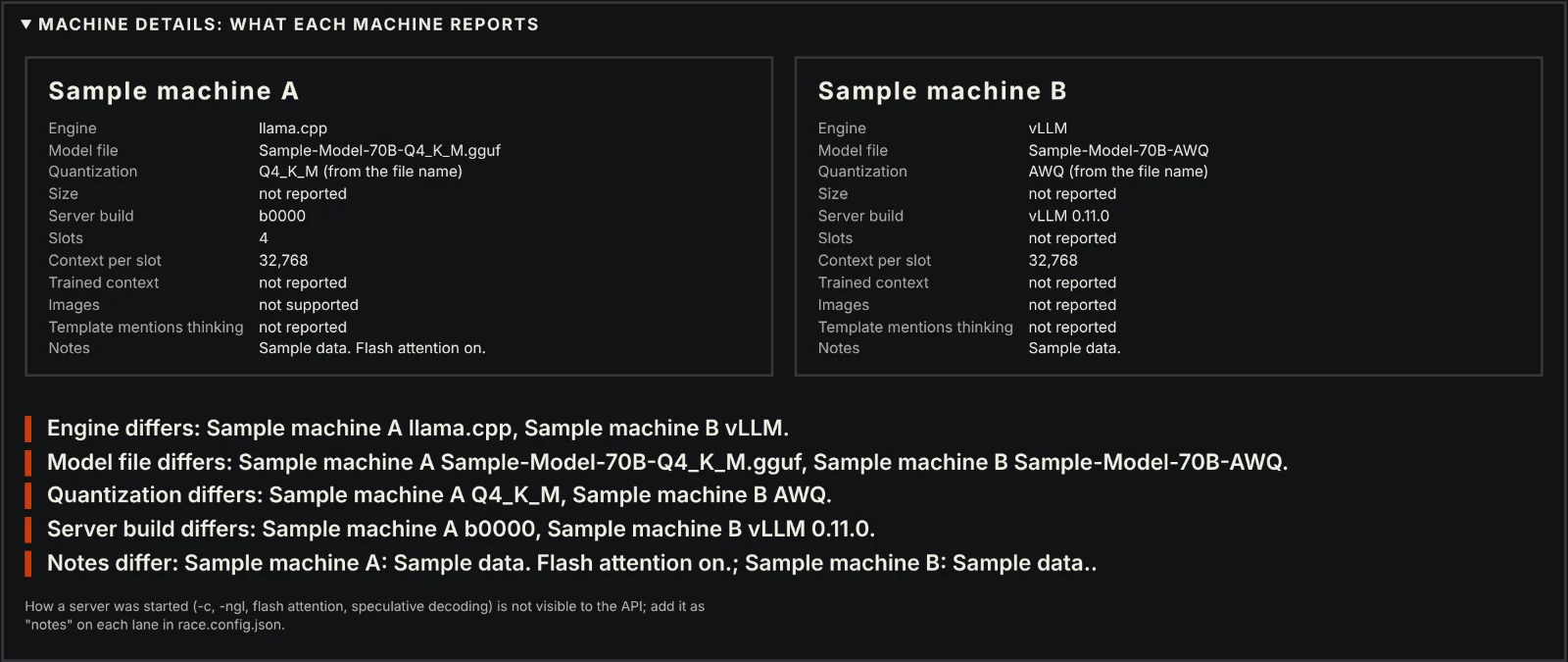
Machines are added from the page itself, so the computer running it can be a headless Mac Mini in a closet. Type an address, the page asks the machine what it is running, and one button saves it.
Charts you can share
When a race or sweep finishes, a View charts button opens a results page in a new tab. It draws:
- Side-by-side bars for first word, speed, throughput and total time at the prompt size and stream count you pick. A line on each bar shows the lowest and highest run, so a spread is never hidden.
- Trend lines for how each number changes as the prompt grows, and as more streams arrive.
- A setup table with each machine's engine, model, quantization, build, reply length and thinking setting.
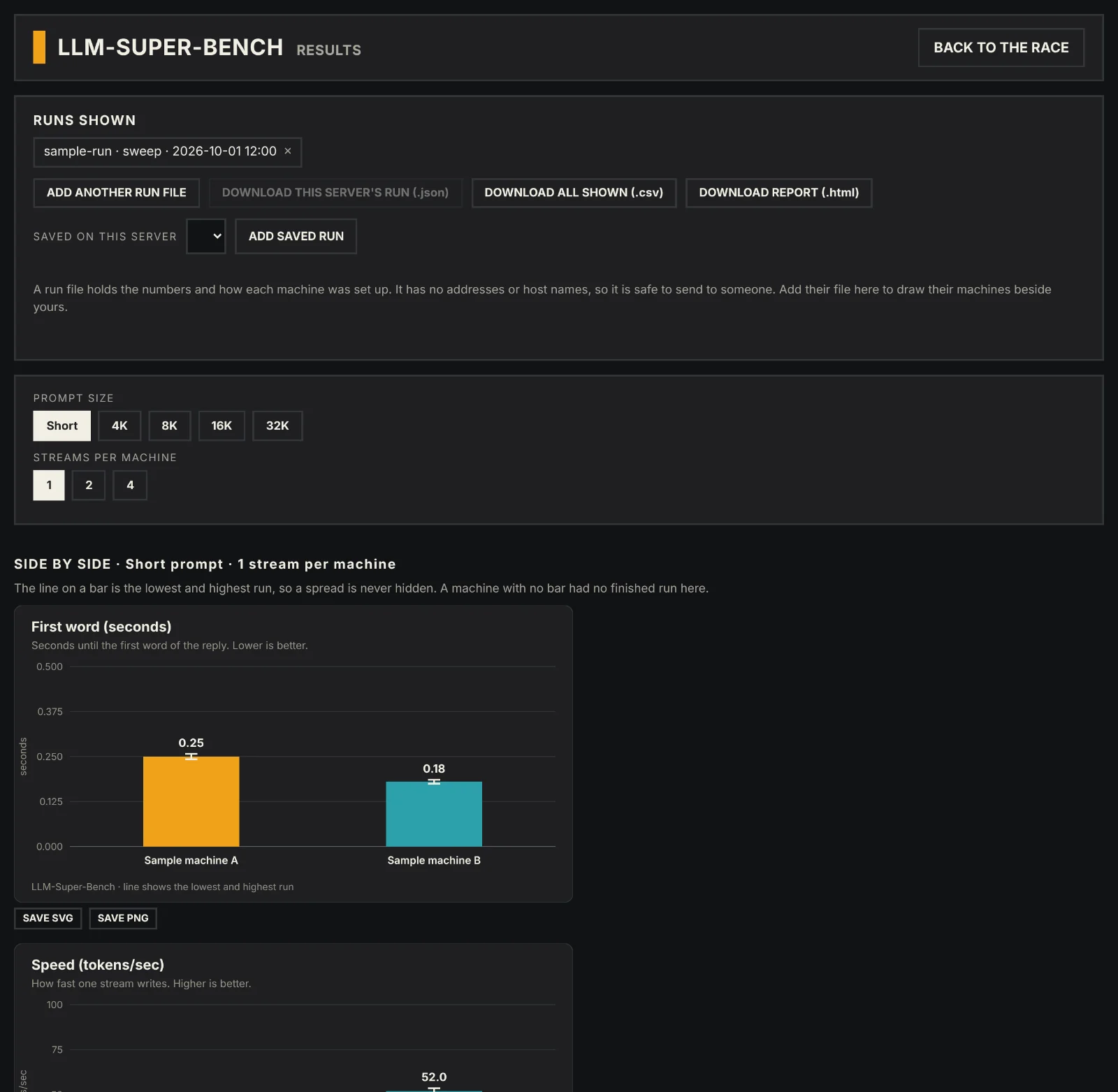
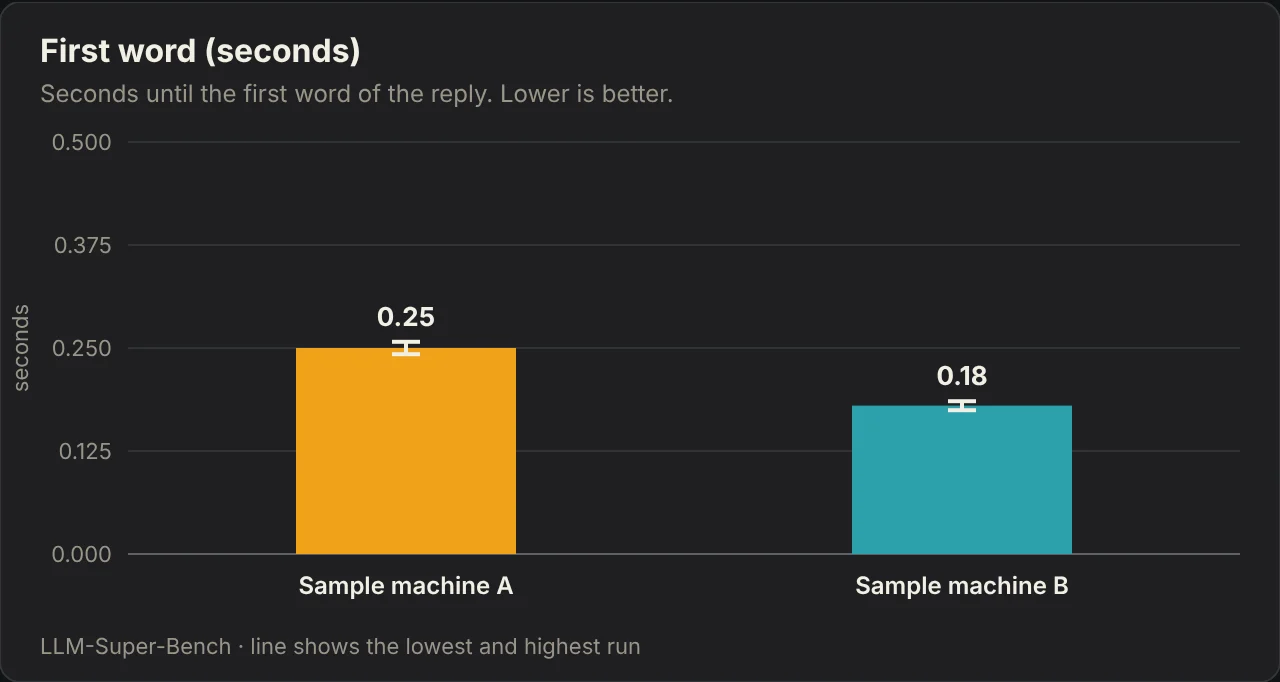
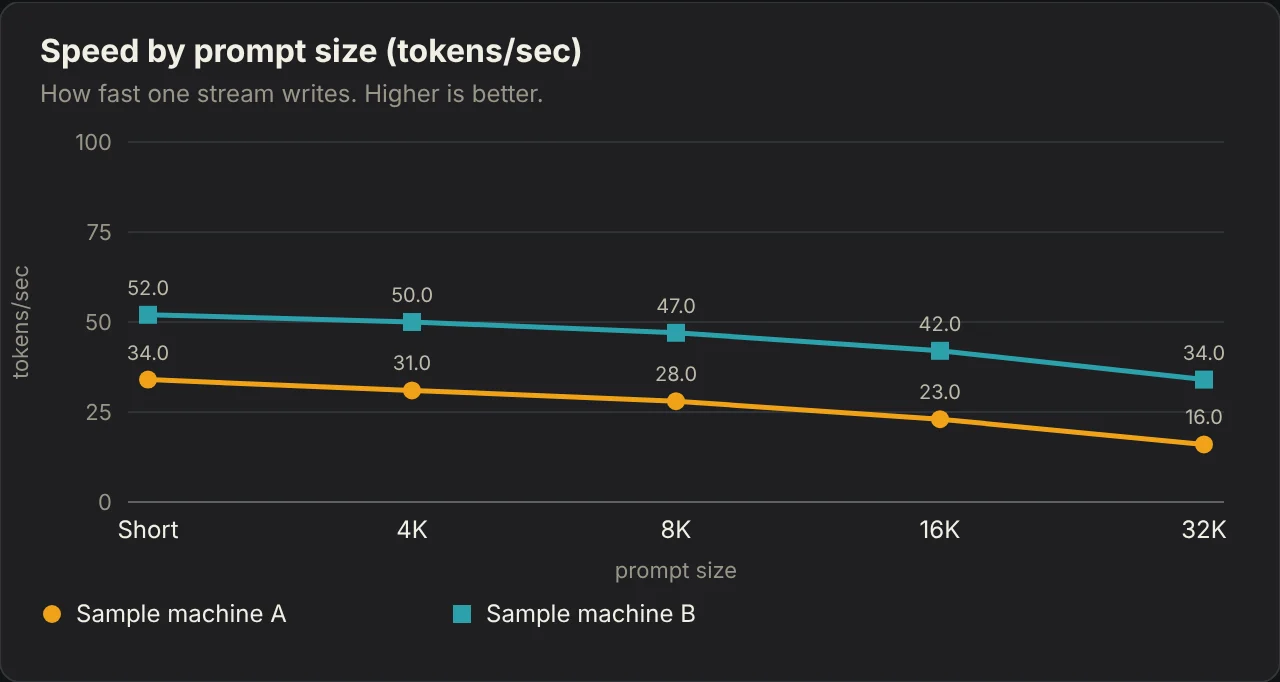
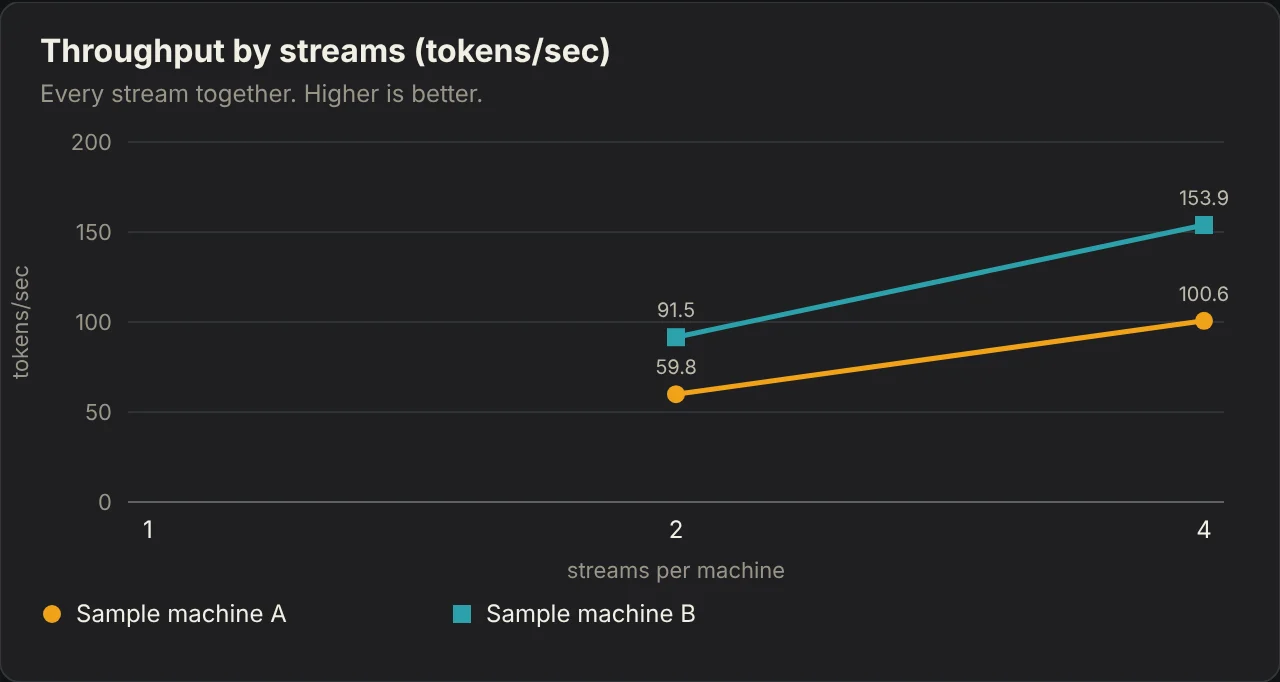
Every chart saves as SVG or PNG. Download report saves the whole page as one HTML file with no scripts, ready to attach or host.
Share the data, not just a picture
Download data saves a small JSON run file. It holds the numbers and how each machine was set up, and nothing that says where the machine is: no addresses, host names or folders. Send it to a friend and they can load it on their own results page, which draws your machines beside theirs. That is how two people with different hardware can compare fairly. To look at someone else's file on its own, Compare run files opens a results tab that starts empty and draws only the files you add. There is also a CSV of everything on screen for spreadsheets, and the tool records which version made each file and warns when you mix versions.
Speed per watt
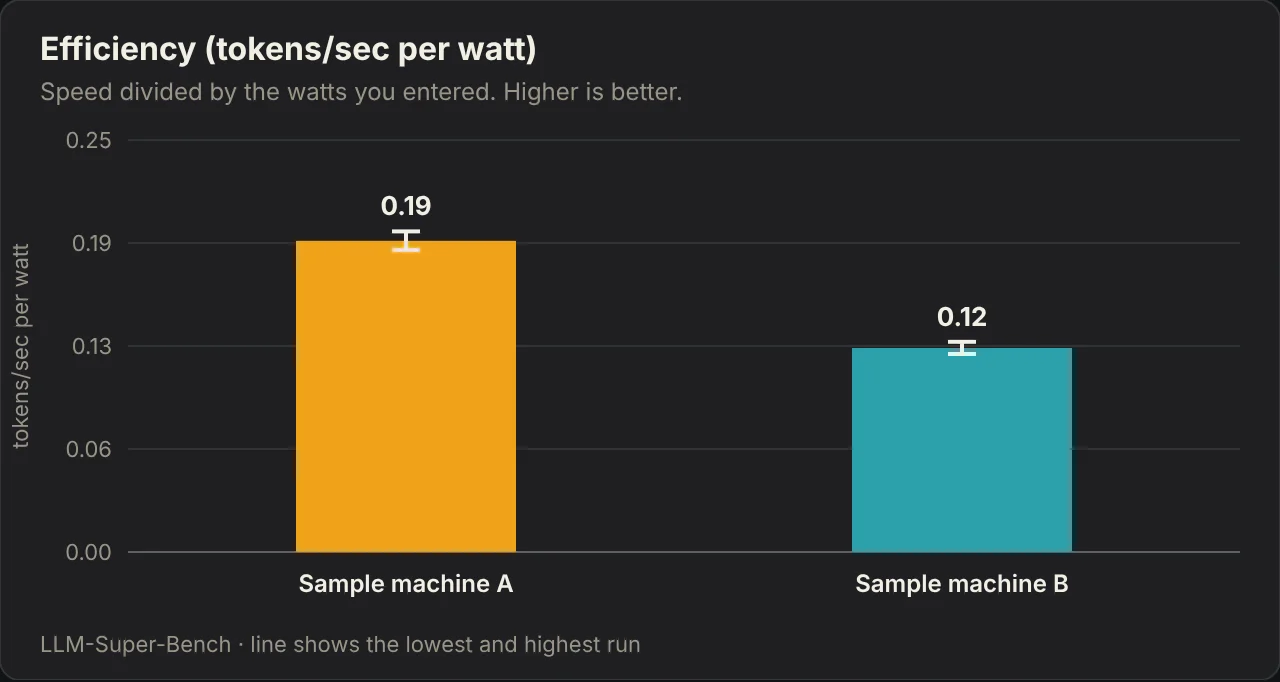
If you measure what a machine draws under load, with a wall meter or a smart plug, type that number in and the charts add tokens per second per watt. The watts are yours; the tool does not measure power, and says so on the chart.
Try it in five minutes
You need one computer with Bun installed, and one or more machines running a local model behind an OpenAI-compatible server, listening on the network (for example --host 0.0.0.0).
- Clone it:
git clone https://github.com/reclaimednode/LLM-Super-Bench - Try it with no AI hardware first: run
bun run mockin one terminal andbun run racein another, open the address it prints and press Start. - Point it at your machines:
RACE_PASSWORD='something-long' bun run race, then add each machine's name and address under Manage machines. - Choose head to head or solo, a prompt size and a stream count, and press Start. Use Sweep for the whole grid.
- Press View charts, then Download data to share the run.
If a machine's details say "not reported", bun run probe http://host:8000 prints exactly what the machine answers, with addresses masked, so you can paste it into an issue.
What it does not do
- A race measures speed, not quality. A fast machine that writes worse answers still wins the clock. Use
bun run qualityto check the answers, and compare machines with each other rather than with a leaderboard: questions are asked zero-shot, which is not how every leaderboard asks them. - One setup is one setup. Results describe your machine, model, quantization, engine build and settings on the day you ran it. That is why the setup is saved beside every number.
- Engine details come from each engine's own status endpoints. Detection was written from documentation and may say "not reported" on an unusual version. The probe command exists to fix exactly that.
- Keep it on a trusted network. The page's password travels over plain HTTP, so use a home network or a private network such as Tailscale, and never open the port to the internet. Other websites cannot act through a saved password, and repeated wrong passwords are locked out.
- Power is typed in, not measured. Speed per watt is only as good as the watts you enter.
Credit and where to get it
LLM-Super-Bench is built on the harness NetworkChuck published in mac-studio-m5-ultra-local-ai, released under the MIT licence. The race itself, the scoreboard, the timing rules and the on-screen design come from that project. Thank you to NetworkChuck for building it and sharing it. What this version adds is listed in the repository's NOTICE file.
The code is on GitHub at reclaimednode/LLM-Super-Bench. If you run it on hardware we have not tried, open an issue with the probe output and we will teach it to read that machine too, and send us your run file if you want it compared against ours.
Version 1.0.0 is out. It is the first tagged release, published November 1, 2026, and the full list of changes is in the changelog. Already running it? bun run update takes the new version safely, then restart the server. Watch or star the repository on GitHub to hear about the next release.
Related: Mac Studio vs. CMP 170HX: Same 27B Model, Same Settings and Same Model, Two Machines: Do the Answers Match? · llama.cpp vs MLX on an M5 Ultra Mac Studio · Same Model, Three Engines: vLLM Puts the CMP 170HX Ahead.