Local AI Image Generation on a 64GB NVIDIA CMP 170HX
Sep 26, 2026 · 6 min read
In the last post I unlocked a pair of NVIDIA CMP 170HX cards to their full 64GB of memory. Language models were the first job. This post covers the second: generating images locally with one of the largest open image models available, at full precision, on a single card.
The full bf16 version of Qwen Image 2512 is about 40GB. On a typical 24GB consumer card you have two options: run a quantized (compressed) version of the model, or offload parts of it to system RAM and accept a large speed penalty. With 64GB of VRAM, neither is necessary. The whole model, the text encoder, and the VAE fit on the GPU at once.
The Setup
The Lightning LoRA is what makes this practical for everyday use. It lets the model produce a finished image in 4 steps instead of the usual 30 or more, and it is designed to run at CFG 1, which also removes the second pass that higher CFG values require.
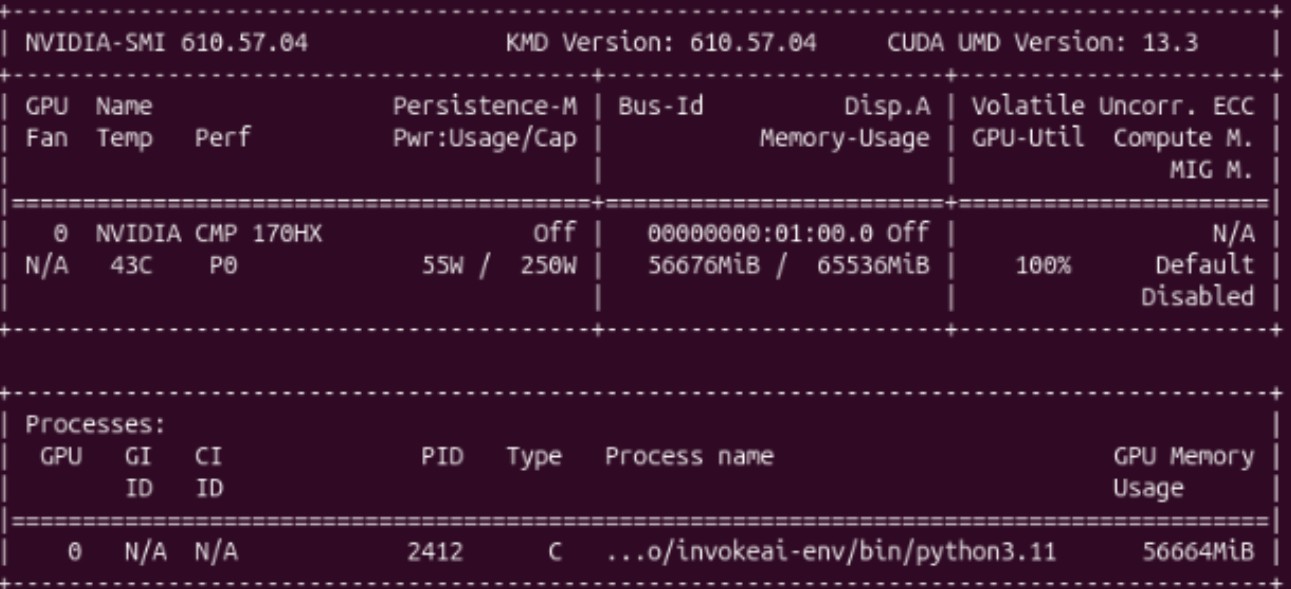
That is roughly 55GiB resident on the card during generation, with about 9GiB to spare. Usage stayed around this level across all six images. Nothing spills into system memory.
The Results
Six prompts, each chosen to test something different: text rendering, fine detail, perspective, crowds, reflections, and difficult lighting. Every image below is straight out of the model with no editing or upscaling.
{{ r.num }}{{ r.title }}
Prompt
{{ r.prompt }}
The 64GB of memory is what makes this setup work. The full-precision model runs entirely in VRAM, with no quantization and no offloading to system RAM, on a card that was sold as a mining-only product.