
One Address for Every Local Model: LiteLLM in Front of the Lab
Nov 13, 2026 · Reclaimed Node · 7 min read
The short version
Our lab serves models from six machines, and about half a dozen things call them: an agent, a chat front end, an assistant hub, document tools and our own scripts. Each one was set up with a machine's address and a model name. Every time we swapped a model, and the posts on this blog show how often that is, we had to go find every client that still used the old name.
We put LiteLLM, an open-source proxy, in front of all of it. Clients now ask one address for a role such as main, assist or tts, and the router decides which machine answers. Swapping a model is a one-line edit in one file. The same address also serves speech, embeddings and a cloud model, and the main role falls back to a second machine if the first is down.
It fit in one evening. This post covers why we picked LiteLLM despite two compromised releases this year, the exact setup, the twelve roles, and what did not fit.
Where this stands
The router is built and every role is tested, but as we publish this our clients still point straight at the machines. Moving them over, one at a time, is the next job, and there is only one router so far. Read this as a build log, not a long-term review.
What a router fixes
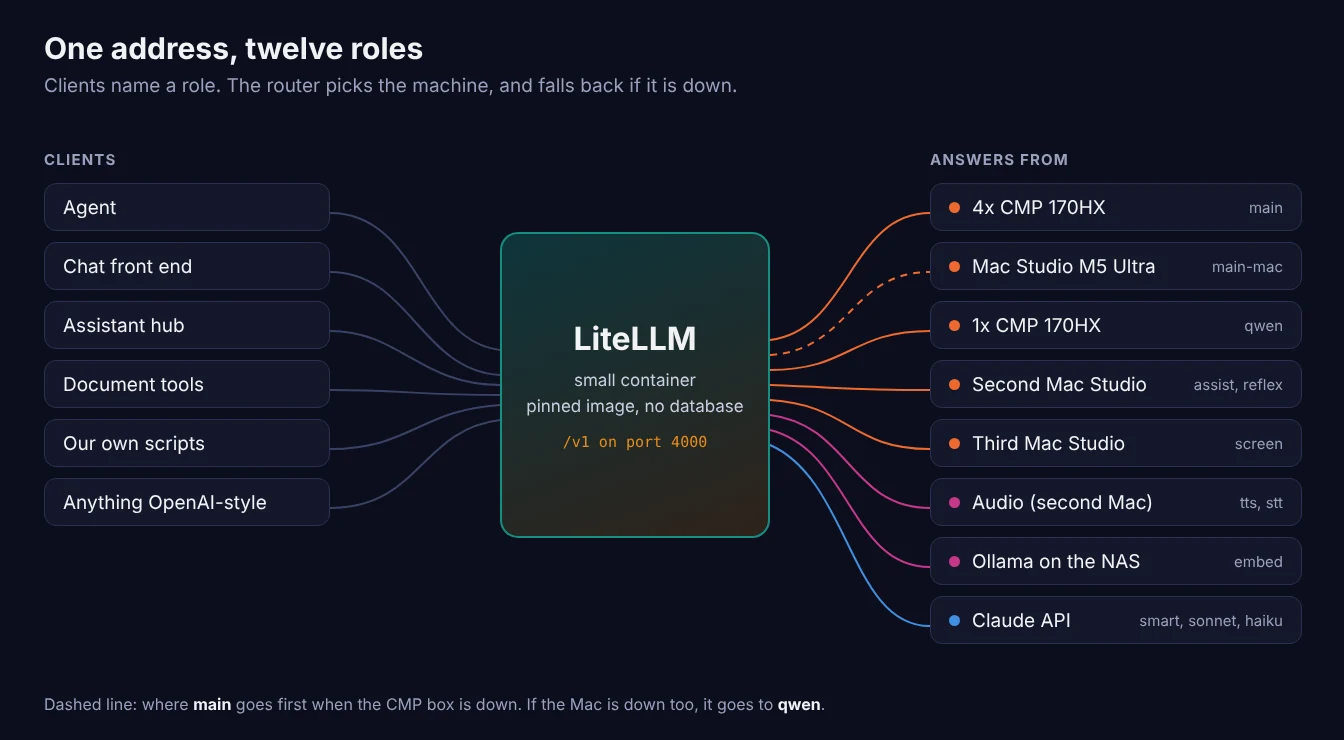
- One address, stable names. A client asks for
main. Which model that is, and which box it runs on, lives in the router's config and nowhere else. - Fallback. If the machine behind a role does not answer, the router tries the next one on the list. Two of our machines serve the same model, so the second is a natural backup for the first.
- Local and cloud on one API. A paid cloud model sits beside the local ones under its own role name, so a client can use it on purpose but never by accident.
- More than chat. Text to speech, speech to text and embeddings go through the same address and key.
Why LiteLLM, and the catch
LiteLLM is the usual self-hosted choice for this job: one container, one YAML file, and it forwards to anything that speaks the OpenAI-style API, which covers vLLM, llama.cpp's server, Ollama and the engine on our Mac. OpenRouter gets suggested for the same problem, but it is a hosted service for cloud models and cannot see machines on your own network.
The catch is its year. On March 24, two malicious versions (1.82.7 and 1.82.8) were published to PyPI with stolen maintainer credentials. On October 21 it happened again: version 1.107.0 went out to PyPI and to the official Docker tags, including latest, main-latest and main-stable, carrying a credential stealer. LiteLLM's own incident report and Datadog's write-up have the details; the bad release was available for roughly two hours.
A router holds API keys and can reach every model server you own, so that history matters. We still chose it, with five rules:
- Pin an exact version and its digest. Never
latestor any other moving tag. Both incidents hit people who installed whatever was newest. - Do not chase releases. We installed v1.108.0, which was nine days old at the time. A two-week wait is a better habit.
- Give it its own container. Nothing else runs there and it holds no SSH keys to other machines, so a bad release would find very little.
- Keep it on the LAN. No public DNS record and no port forward.
- Cap the cloud key at the provider. Set a monthly spend limit on the provider's side for any paid key the router holds, because this setup has no budget feature of its own.
The main alternative is Bifrost, a single Go binary with no extra services. We did not test it. An independent benchmark this month found Bifrost far faster under heavy load, measured LiteLLM adding 30 to 55 ms at the median at 100 requests per second, and saw both survive a killed backend without a failed request. For a household where a reply takes seconds of model time, that overhead is small. If you would rather avoid a project with LiteLLM's 2026, Bifrost is where we would look first.
The setup
The router runs in a small unprivileged LXC on Proxmox: 2 cores, 2 GB of memory, an 8 GB disk, Debian 13, with Docker inside (nesting turned on). It runs from a config file alone. There is no database, which keeps it simple and makes a second copy easy later; the price is no web dashboard and no built-in budgets.
1. Pull a pinned image and check its digest
docker pull ghcr.io/berriai/litellm:v1.108.0
docker images --digests ghcr.io/berriai/litellm
Compare the digest it prints with one recorded somewhere you trust, such as the project's release page or another public repository that pinned the same release. Ours matched a pin made on the day of release, which says the tag has not been swapped since. From then on, refer to the image by tag and digest together.
2. The config
Each entry gives a role name, the real model name on that server, and the server's address. The addresses below are placeholders. Audio and embedding entries need a mode line; chat entries do not.
model_list:
  - model_name: main            # 4x CMP 170HX, DeepSeek V4.1 Flash on vLLM
    litellm_params:
      model: openai/dsv41-flash
      api_base: http://10.0.0.30:8000/v1
      api_key: none
  - model_name: main-mac        # Mac Studio M5 Ultra, same model
    litellm_params:
      model: openai/DeepSeek-V4.1-Flash
      api_base: http://10.0.0.20:8001/v1
      api_key: none
  - model_name: qwen            # single CMP 170HX on vLLM
    litellm_params:
      model: openai/qwen3.8-27b
      api_base: http://10.0.0.40:8000/v1
      api_key: none
  - model_name: tts             # Kokoro
    litellm_params:
      model: openai/mlx-community/Kokoro-82M-bf16
      api_base: http://10.0.0.6:8881/v1
      api_key: none
    model_info:
      mode: audio_speech
  - model_name: embed           # nomic-embed-text on Ollama
    litellm_params:
      model: openai/nomic-embed-text
      api_base: http://10.0.0.50:11434/v1
      api_key: none
    model_info:
      mode: embedding
  - model_name: smart           # cloud, paid
    litellm_params:
      model: anthropic/claude-fable-5-2
      api_key: os.environ/ANTHROPIC_API_KEY

router_settings:
  fallbacks: [{"main": ["main-mac", "qwen"]}]
  num_retries: 1
  timeout: 600

general_settings:
  master_key: os.environ/LITELLM_MASTER_KEY
The two keys live in a .env file readable only by root. The master key is what clients send as their API key.
3. Start it
docker run -d --name litellm --restart unless-stopped -p 4000:4000 \
  --env-file /opt/litellm/.env \
  -v /opt/litellm/config.yaml:/app/config.yaml:ro \
  ghcr.io/berriai/litellm:v1.108.0@sha256:<the digest you checked> \
  --config /app/config.yaml --port 4000
Docker reads the .env file when the container is created, not when it restarts. After adding a key or a role, remove the container and run the command again.
The twelve roles
| Role | Kind | Answers from |
|---|---|---|
main | Chat | DeepSeek V4.1 Flash on 4x CMP 170HX, then the Mac Studio, then qwen |
main-mac | Chat | The same model on a Mac Studio M5 Ultra |
qwen | Chat | Qwen3.8 27B on a single CMP 170HX |
assist | Chat | Gemma 4 12B on a second Mac Studio |
reflex | Chat | Qwen3 1.7B on the same Mac, for quick small jobs |
screen | Chat | UI-TARS 1.5 7B on a third Mac, for reading screenshots |
tts | Text to speech | Kokoro |
stt | Speech to text | Parakeet |
embed | Embeddings | nomic-embed-text on Ollama, on the NAS |
smart | Chat, paid | Claude Fable 5.2 |
sonnet | Chat, paid | Claude Sonnet 5.5 |
haiku | Chat, paid | Claude Haiku 5.5 |
The names describe a job, not a model. When the main model changes again, main keeps its name and no client notices. The cloud roles are deliberately not on any fallback list: if both DeepSeek machines and the Qwen box are down, main fails instead of quietly sending an agent's traffic to a paid service.
Testing it
Every role got a request through the router before we called it done:
- Chat. A short prompt to each chat role. The models' separate reasoning text came through the router intact.
- Speech, both ways. We asked
ttsto say "The router is now handling audio," got back a 127 KB WAV file, sent that file tostt, and got the same sentence back word for word. - Embeddings. One sentence to
embedreturned its vector.
curl http://ROUTER:4000/v1/audio/speech -H "Authorization: Bearer $KEY" \
  -H "Content-Type: application/json" \
  -d '{"model":"tts","input":"The router is now handling audio.","voice":"af_heart","response_format":"wav"}' \
  -o test.wav

curl http://ROUTER:4000/v1/audio/transcriptions -H "Authorization: Bearer $KEY" \
  -F model=stt -F file=@test.wav
What did not fit
- Image generation. Our image server has its own API, not the OpenAI-style one, so the router cannot front it.
- The home voice assistant. It works today and is sensitive to delay, so for now it stays pointed straight at its models.
- Small models that live inside another stack. Our document tools talk to their own small models inside the same Docker stack. Sending that through a router on another machine would add a dependency and gain nothing. The better move is to point those tools at the router's bigger models later.
Things that tripped us up
- The wrong container template. Proxmox now lists ARM builds beside the x86 ones. A one-liner that grabbed the newest Debian 13 template picked the ARM build, and the container refused to start on our x86 host. Filter for
amd64. - A pasted command split in two. A multi-line
docker runbroke at a line break in the console. Pasting it as one line fixed it. - Testing one port and calling it closed. We decided a model server was not reachable after trying only its default port. It was listening on a different one. Check what the service publishes before ruling it out.
- Not everything a server can load is loaded. We nearly added a role for a speech model that the audio server no longer had running. Ask each server for its model list first and build the config from that.
What this shows, and what it does not
- Built and tested, not yet lived with. No client has been moved onto the router. Odd parameters, long agent sessions and streaming under load are still untested.
- One router is one point of failure. If it stops, every client that uses it stops. Until there is a second one, we keep the direct addresses written down.
- We did not measure its overhead. The benchmark linked above did. We will check it against our own numbers once clients are on it.
- No dashboard and no budgets. Both need a database we chose not to run, so any cloud spend limit has to be set with the provider.
Next
- Move the clients. The agent first, then the chat front end, then the rest, one at a time so a problem is easy to trace.
- Failover. A second copy of the router on a different machine, and a DNS record that health-checks both and only hands out one that answers.
- A week of real use, then a follow-up with what broke.
Related: DeepSeek V4.1 Flash on 4x CMP 170HX: Benchmark Results · DeepSeek V4.1 Flash on a Mac Studio with TensorFold · Homelab Software Breakdown: Operating Systems, Virtualization, and Containers