The Ultimate Homelab BMC Showdown
Dell iDRAC vs. HPE iLO vs. Lenovo XCC
When picking second-hand enterprise servers for a home lab, the processor and RAM often get all the attention. But the unsung hero of your basement or closet server rack is the Baseboard Management Controller (BMC). Your BMC determines whether you enjoy seamless, headless remote control from your web browser, or suffer constant trips to the server rack with a crash cart and a USB drive.
Today, we are putting the big three head-to-head: Dell iDRAC, HPE iLO, and Lenovo XClarity Controller (XCC).
For this comparison, we are assuming you have unlocked the full potential of these machines (iDRAC Enterprise, iLO Advanced, and XCC Enterprise). However, we must first address the elephant in the room: what happens when you buy a server without a license.
1. The Paywall Reality: What Happens if You Are Unlicensed?
When enterprise IT decommissions hardware, licenses sometimes get wiped. In the refurbished market, Dell practically gives away its Enterprise licenses, while HPE and Lenovo treat them as premium add-ons.
- The Unlicensed HPE iLO Penalty: iLO Standard lets you access the HTML5 console to adjust BIOS settings, but the moment the OS bootloader takes over (e.g., booting into Proxmox or ESXi), iLO disconnects your session. Virtual Media (mounting ISOs) is also completely disabled without an Advanced key.
- The Unlicensed Lenovo XCC Brick Wall: Lenovo's base XCC tier completely disables the remote KVM console and Virtual Media. Without a Feature-on-Demand (FoD) upgrade key, an unlicensed Lenovo server is just a dumb node you can only power-cycle remotely.
- Why Dell iDRAC Wins the Used Market: Dell ties iDRAC Enterprise licenses permanently to the motherboard service tag. Used PowerEdge servers almost always ship with Enterprise pre-activated. If not, digital license keys are incredibly cheap on the secondary market.
The Takeaway: If you buy HPE or Lenovo, always verify it includes an Advanced/Enterprise key, or you'll be fetching a physical keyboard.
2. Interface and Daily Navigation
Once fully licensed, all three platforms offer highly responsive HTML5 consoles. No more Java applets required. But how do their dashboards actually feel to use?
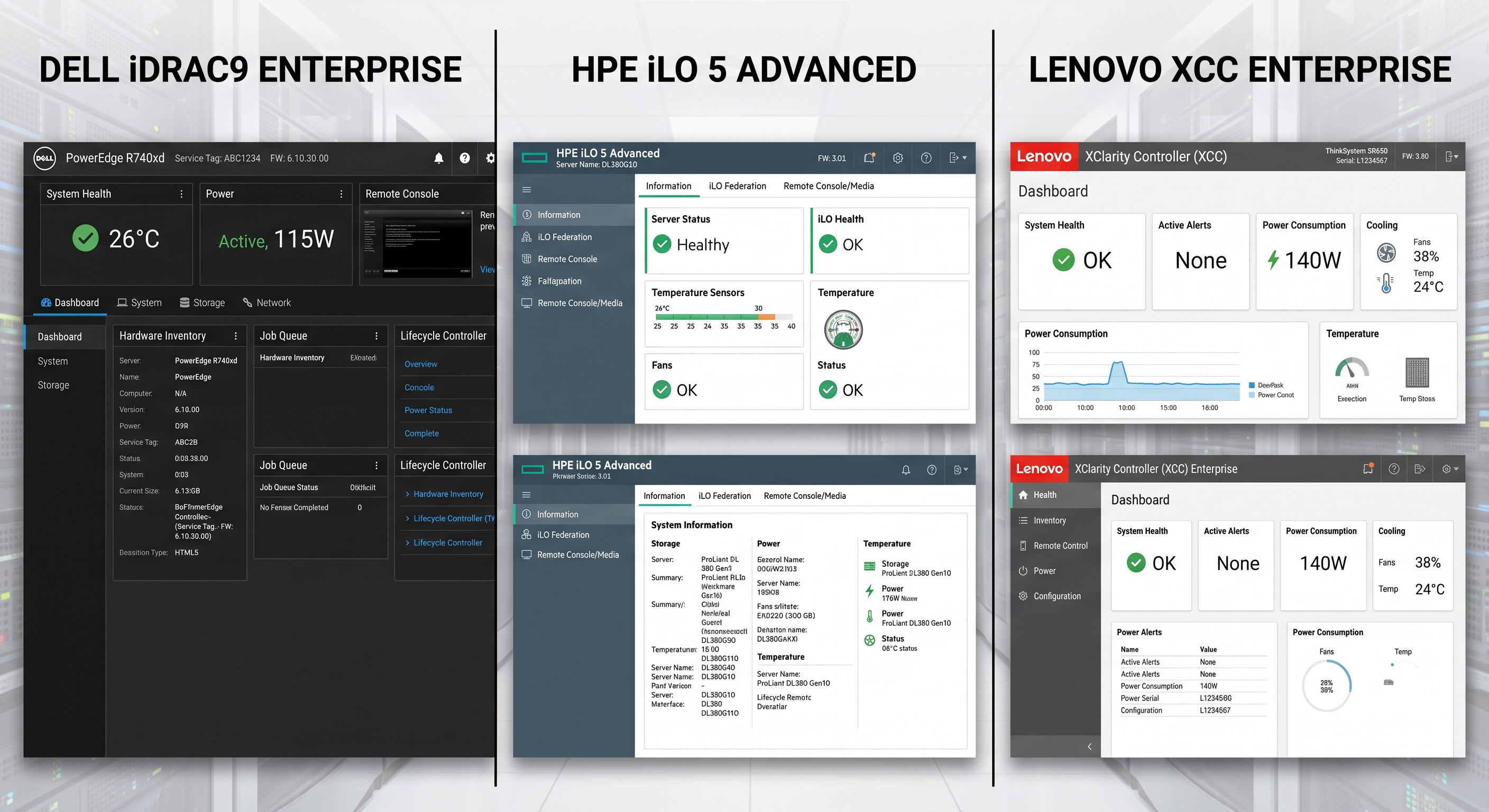
Main Dashboard Interfaces — Dell iDRAC (left) uses a dark block-style layout with hardware inventory and Lifecycle Controller. HPE iLO (center) prioritizes dense health summaries and sensor data. Lenovo XCC (right) uses a clean, modern card-based interface for rapid system overview.
The KVM Experience
- Dell iDRAC: Offers a pop-out HTML5 KVM that is highly reliable. Virtual media controls and macro keys (like Ctrl+Alt+Del) are neatly tucked into a dropdown menu at the top of the viewer.
- HPE iLO: Arguably the fastest and lowest-latency HTML5 KVM of the bunch. It feels incredibly snappy, though navigating to the virtual media mount menu requires a few extra clicks in the sidebar before launching the console.
- Lenovo XCC: Very clean and intuitive, offering a seamless virtual media mounting process directly within the KVM window, minimizing friction when installing a new OS.
HTML5 KVM Viewers — Notice how Dell and Lenovo keep Virtual Media mount controls directly inside the console window, while HPE often requires mounting media from the main dashboard before launching the KVM.
3. Platform Firmware Updates: The Maintenance Workflow
Updating system-wide firmware (BIOS, RAID controllers, NICs, PSUs, and drives) highlights massive architectural differences between the vendors.
HPE iLO: The "Bootable ISO" Heavyweight
While you can update the iLO firmware itself via the web UI, updating the rest of the server requires HPE's Service Pack for ProLiant (SPP).
- You download a massive (8GB+) SPP ISO.
- Mount it via Virtual Media.
- Boot the physical server into the offline Smart Update Manager (SUM) OS.
- Wait for it to inventory and flash.
The Catch: SPP ISOs are actively gated behind HPE warranty/support paywalls, making updates tedious for second-hand owners.
Dell iDRAC: The Out-of-Band Benchmark
Dell bakes full platform orchestration directly into the iDRAC via the Lifecycle Controller.
- Download standard
.exeor.binupdate packages for any component freely from Dell's site. - Upload them directly into the iDRAC web interface.
- Queue the jobs and reboot once.
The Lifecycle Controller flashes all devices during POST. No offline ISOs, no OS booting required.
Lenovo XCC: The Hybrid Approach
Lenovo offers completely free, unrestricted firmware downloads.
- Individual Updates: You can upload web binaries for the UEFI and XCC directly into the web UI (like Dell).
- System-wide Bundles: To apply a massive UpdateXpress System Pack (UXSP), you must use Lenovo's Bootable Media Creator (BoMC) on your PC to generate a custom ISO, mount it, and boot the server (like HPE).
Firmware Update Workflows — Dell iDRAC allows direct uploading of full platform packages out-of-band. HPE iLO relies on booting into the standalone Smart Update Manager (SUM) environment.
4. The Fan Noise Battle: Third-Party Hardware
Homelabs run on cheap, third-party hardware. Dropping a consumer NVMe SSD on a PCIe adapter, or a cheap Mellanox 10GbE card into your server can trigger wildly different acoustic reactions.
- HPE iLO ("Jet Engine Mode"): HPE relies on a "3D Sea of Sensors." If you install a PCIe card that lacks native HPE thermal telemetry, iLO panics. To prevent overheating, it defaults system fans to maximum speed. Silencing an HPE server with non-OEM gear requires complex, community-built modded scripts.
- Dell iDRAC (The Tinkerer's Dream): Dell servers may bump fan speeds slightly when they detect non-Dell PCIe cards, but they allow you to override this. By sending a simple IPMI command (or using Dell's RACADM CLI), you can disable the third-party PCIe thermal response, returning your server to a quiet purr.
- Lenovo XCC (Quiet and Conservative): Lenovo maintains modest acoustic profiles. Adding unverified third-party hardware rarely causes the fans to spool up to maximum, making it a very quiet, plug-and-play homelab neighbor.
Thermal and Sensor Displays — HPE's 3D Sea of Sensors provides incredible detail, but triggers aggressive cooling if data is missing. Dell provides direct fan speed offsets to easily silence the machine.
Final Verdict: Which is Best for Your Homelab?
All three BMCs are marvels of out-of-band engineering, but for the average homelabber, there is a clear hierarchy based on ease of use and cost of ownership.
🏆 Winner: Dell iDRAC (PowerEdge)
If you want the most forgiving homelab experience, Dell is the king. Perpetual enterprise licenses are practically free on the used market, the out-of-band Lifecycle Controller makes updates a breeze without offline ISOs, and you can easily silence the fans when using third-party PCIe cards.
🥈 Runner Up: Lenovo XCC (ThinkSystem)
Lenovo is an incredibly strong contender. The interface is beautiful, firmware is 100% free and easy to download, and the servers run quietly with non-OEM hardware. The only downside is the reliance on BoMC ISOs for full-system updates and a smaller community knowledge base.
🥉 Third Place: HPE iLO (ProLiant)
HPE offers arguably the fastest, most responsive KVM on the market. However, the combination of paywalled SPP update ISOs, the strict enforcement of advanced KVM license keys, and the infamous "jet engine" fan noise when installing cheap third-party hardware makes them a higher-maintenance choice for a home environment.