
DeepSeek V4.1 Flash on a Mac Studio with TensorFold: 2 to 3x llama.cpp's Speed
Nov 12, 2026 · Reclaimed Node · 10 min read
The short version
Same Mac Studio M5 Ultra, same DeepSeek V4.1 Flash, a different engine. In DeepSeek V4.1 Flash on a Mac Studio: DSpark at 8 Users and a One-Line llama.cpp Fix the Mac ran llama.cpp and wrote 41 to 43 tokens/sec for one user. With a TensorFold build made for this model, the same Mac writes 69 to 72 tokens/sec, reads prompts at about 1,650 to 1,730 tokens/sec instead of 550 to 580, and puts out 2 to 2.5 times as many tokens in total when several users share it.
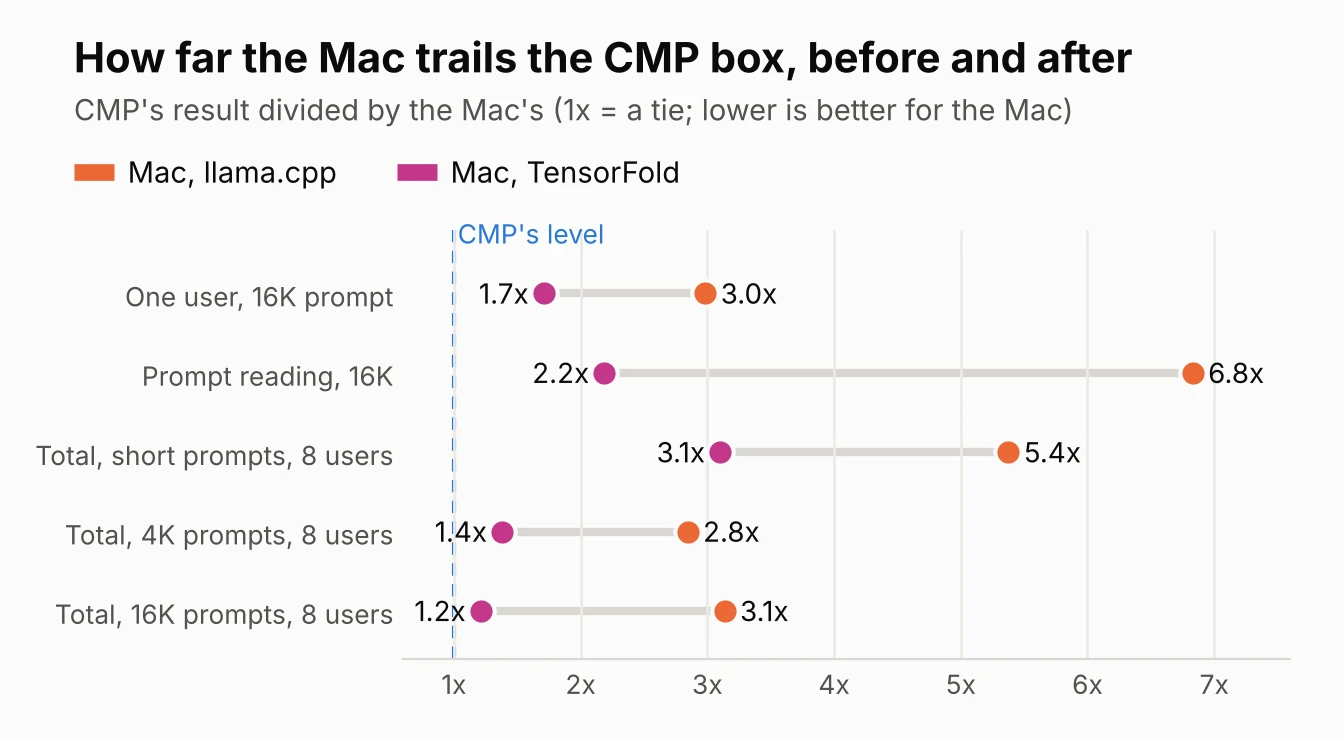
That roughly halves the gap to our four CMP 170HX cards. One user is now 1.7x slower than the CMP box instead of 3x, and with 16K prompts and 8 users the Mac reaches 30 tokens/sec against the CMP box's 36. Tool calls, JSON-schema replies and image input all worked on the first try.
Credit where it is due
This setup is not ours. TensorFold is Ash Hart's inference engine; the DeepSeek V4.1 Metal support is a fork by BobClawblaw (deepseek-v41-main), with a one-Mac recipe and a converted checkpoint. We followed the recipe as written and only changed the port, the API key and two settings, listed below. The fork is not part of upstream TensorFold yet.
Setup
| Mac, llama.cpp | Mac, TensorFold | 4x CMP 170HX | |
|---|---|---|---|
| Engine | llama-server (Unsloth's build b12246 plus a one-line Metal fix) | TensorFold fork, commit 72a552ed (native Metal engine) | vLLM 0.32.1rc1, tensor parallel 4 |
| Model build | UD-Q2_K_XL (2-bit GGUF) | 2-bit experts, 3-bit in layers 10 to 29, 4-bit block projections, 8-bit head (418 GB on disk) | Hybrid EXL3 + FP8 |
| Engram tables | SSD | SSD (189 GiB, memory-mapped) | System RAM |
| Requests at once | 8 | 4 (the engine's limit for this model) | 8 |
| Context | 262,144 tokens, shared | 1,048,576 tokens, shared | 262,144 tokens per request |
| Speculative decoding | DSpark, 5 draft tokens | DSpark head, draft depth chosen by the engine | DSpark, up to 7 draft tokens |
| Memory in use | about 200 GiB | about 202 GiB | 4 x 32 GB cards plus RAM |
Test settings were the same for every setup: LLM-Super-Bench from a second Mac on the network, thinking off, temperature 0, replies capped at 512 tokens, prompts tagged so no cache could help. Prompt sizes were short (about 40 tokens), 4K and 16K, with 1, 2, 4 and 8 users and 3 runs each: 36 races, none failed. The CMP numbers come from DeepSeek V4.1 Flash Head to Head: 4x CMP 170HX vs Mac Studio M5 Ultra.
How we set it up
1. What the Mac needs
Full Xcode with its Metal toolchain (the Command Line Tools alone are not enough), Zig 0.17.0, Python 3.11 or newer, cmake and the Hugging Face hf tool. The checkpoint is 418 GB, so plan for about 440 GB free. Installing the Metal toolchain is one command once Xcode is in place:
DEVELOPER_DIR=/Applications/Xcode.app/Contents/Developer xcodebuild -downloadComponent MetalToolchain
2. Get the recipe, the engine and the weights
git clone https://github.com/BobClawblaw/deepseek-v41-flash-mlx-m5-ultra
git clone -b deepseek-v41-main https://github.com/BobClawblaw/TensorFold ~/github/TensorFold
hf download BobClawblaw/DeepSeek-V4.1-Flash-1017-TensorFold-e2e3-p4-h8 \
    --local-dir ~/models/DeepSeek-V4.1-Flash-1017-TF-mix23-d8b4
3. This Mac's settings
The recipe reads local.toml for anything that differs from its defaults. Ours serves the network on the port our benchmark already used, sets the same API key, turns thinking off by default for the benchmark and opens the model's full million-token window:
[engine]
zig = "~/.local/zig-0.17.0/zig"
developer_dir = "/Applications/Xcode.app/Contents/Developer"

[local]
host = "0.0.0.0"
port = 8001

[serve]
api_key = "..."
parallel = 4
context = 1048576
thinking = false
4. Build, start and check
python3 -m mac up builds the pinned engine once and starts the server; it refuses to start if free memory is short of the weights plus a 6 GiB margin. Qwen had to be stopped first: two models of this size do not fit in 256 GB together. Before benchmarking we sent four checks:
| Check | Result |
|---|---|
| Plain chat | Correct, 0.1 s once warm (3.9 s for the very first request, which reads the Engram tables from the SSD) |
| Tool call | get_weather with {"city": "Kansas City"} |
| JSON schema | A valid reply that fit the schema: first iPhone, 2007 |
| Image | A solid red test image named correctly in 0.3 s |
| 8 requests at once | All 8 finished; the server held 202 GiB throughout |
One user
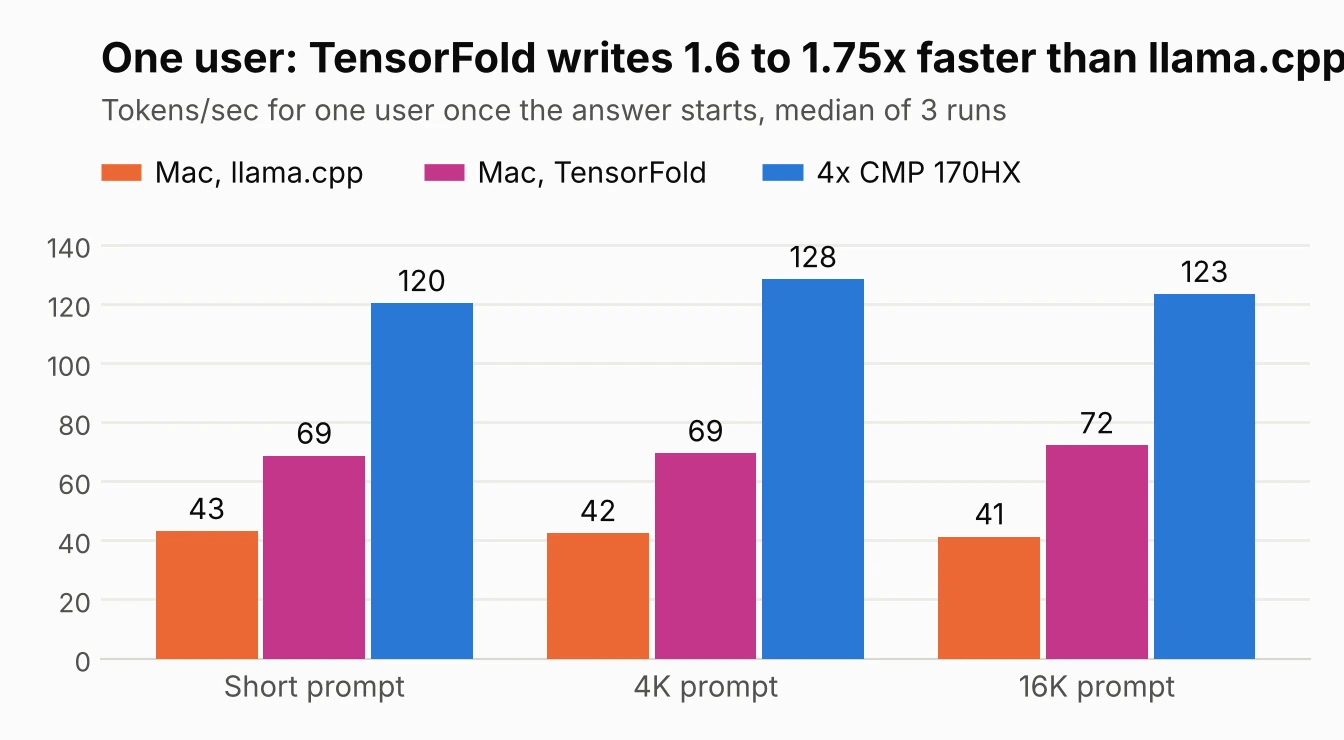
TensorFold writes 1.6 to 1.75 times as fast as llama.cpp on the same Mac and holds that speed as prompts grow, which matches the recipe's own figures (70.7 tokens/sec on prose). The CMP box is still 1.7 to 1.8 times faster for one user.
Reading prompts and the first word
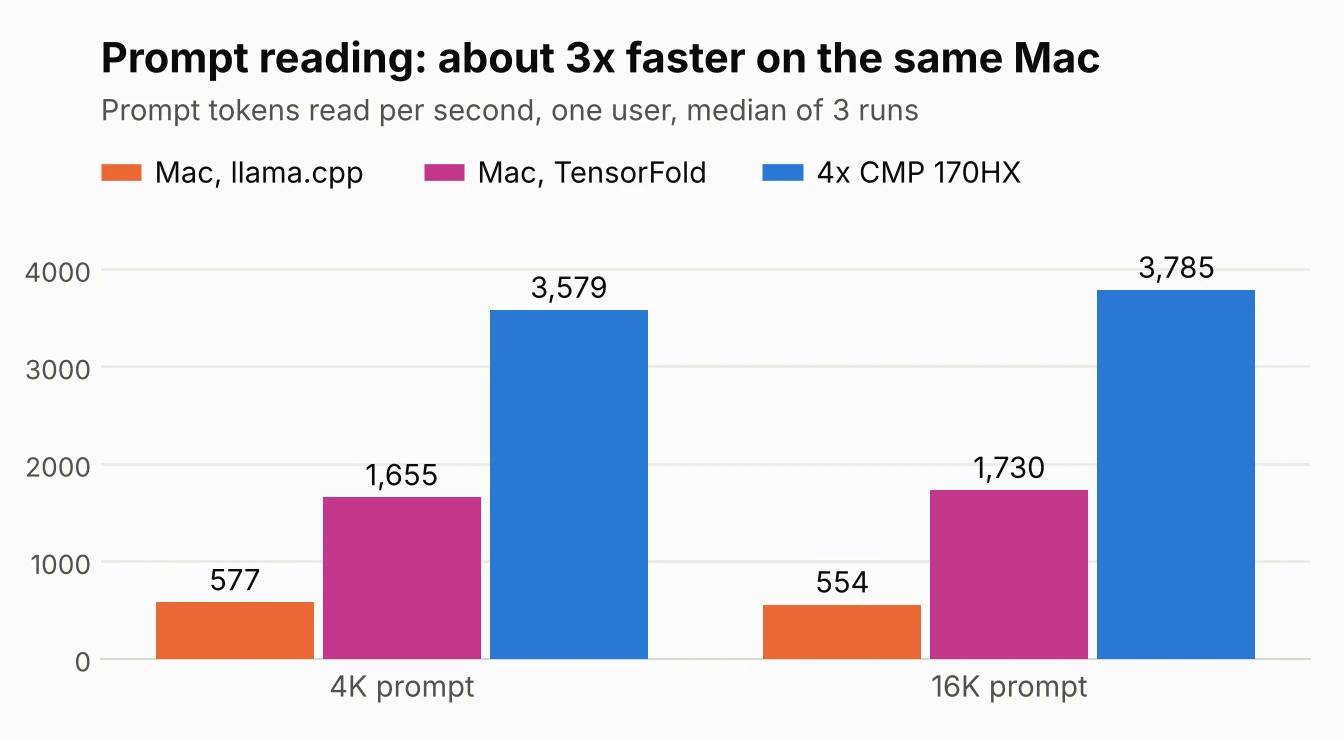
Prompt reading moved the most. The recipe runs the prompt's expert layers as int8 on the M5's GPU tensor units, about twice the speed of the plain path, and reads prompts in chunks of up to 3,968 tokens when one user has the Mac to itself. The result is about 3 times llama.cpp's rate, and the CMP box's lead shrinks from 6 to 7 times to about 2.2 times.
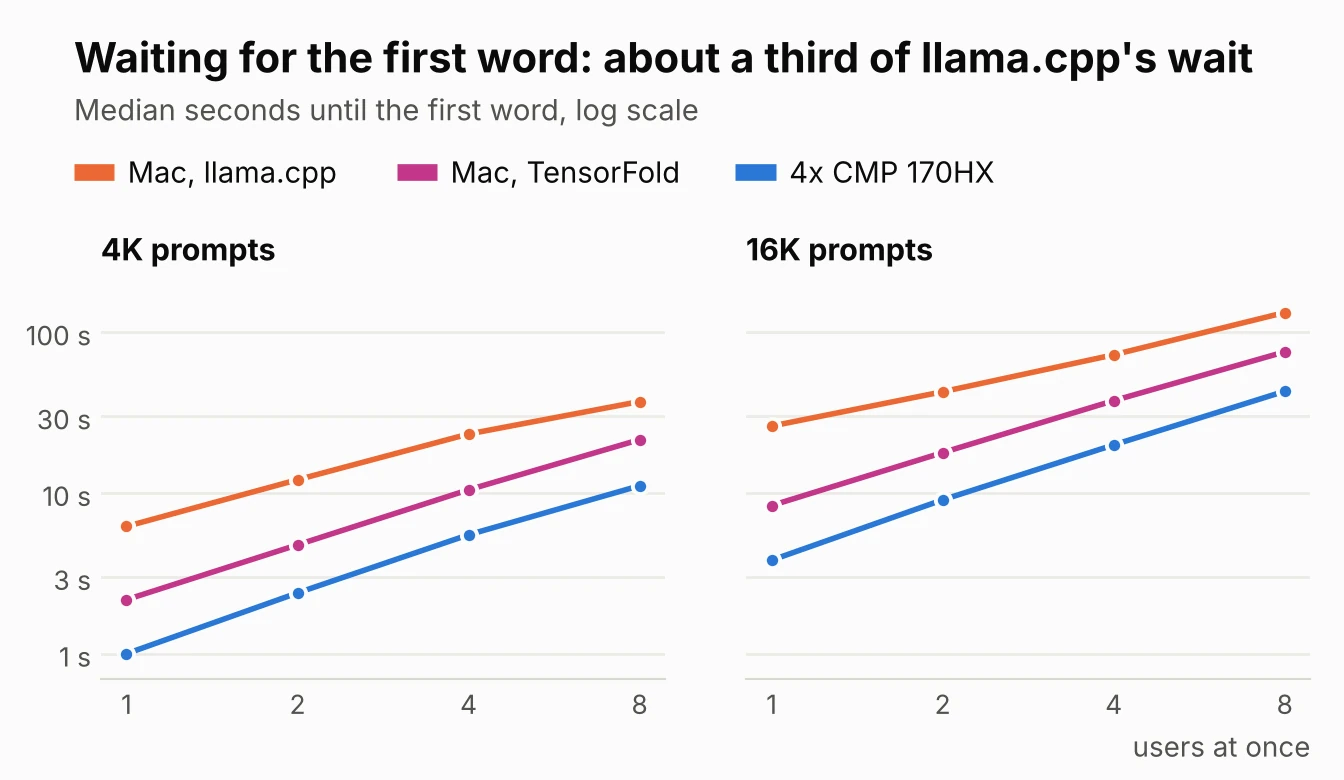
Faster reading shows up directly as less waiting: a single 16K prompt starts answering in 8.4 seconds instead of 26, and with 8 users each sending 16K, the median wait drops from 133 seconds to 76.
Several users at once
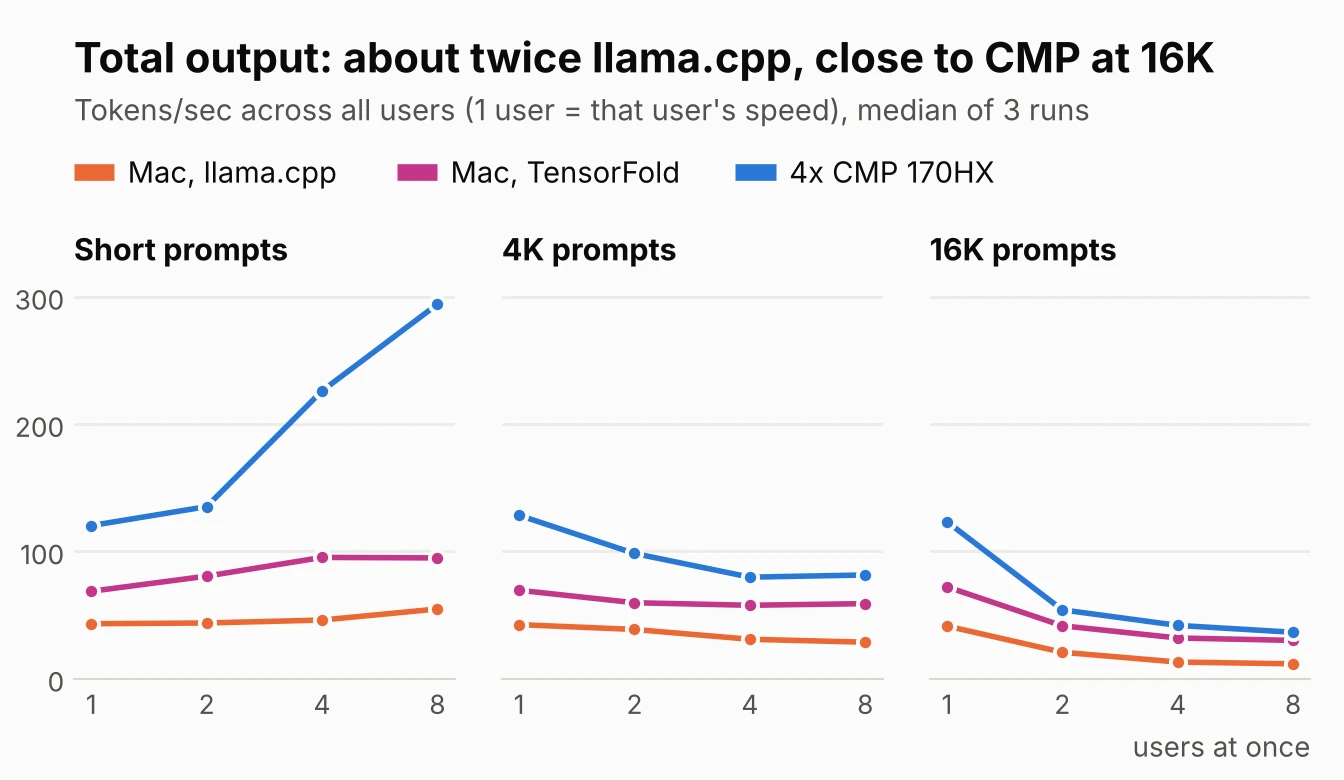
| Total tokens/sec | Mac, llama.cpp | Mac, TensorFold | 4x CMP 170HX |
|---|---|---|---|
| Short prompts, 4 users | 46 | 95 | 226 |
| Short prompts, 8 users | 55 | 95 | 294 |
| 4K prompts, 4 users | 31 | 58 | 80 |
| 4K prompts, 8 users | 29 | 59 | 81 |
| 16K prompts, 4 users | 13 | 32 | 42 |
| 16K prompts, 8 users | 12 | 30 | 36 |
With short prompts the CMP box still runs away, to 294 tokens/sec at 8 users against the Mac's 95. Once prompts get longer, every machine spends most of its time reading them, and that is where the Mac's faster reading pays off: at 16K and 8 users it is within 20% of the CMP box.
Why 8 sessions did not help
We also reran the 4 and 8 user races with the server set to 8 sessions and the full million-token window. The numbers came back within run-to-run noise of the first run:
| Total tokens/sec (first word) | Set to 4 sessions | Set to 8 sessions |
|---|---|---|
| Short prompts, 8 users | 95 (2.0 s) | 95 (2.2 s) |
| 4K prompts, 8 users | 59 (21.5 s) | 62 (20.4 s) |
| 16K prompts, 8 users | 30 (75.7 s) | 30 (72.1 s) |
Reading the engine's source explained it: the DeepSeek host clamps sessions to four (@min(o.lanes, 4) in native/deepseek_v41.zig), so requests five to eight wait for a free session whatever the setting says. It would not have mattered much anyway. All users share one prompt reader, and eight 16K prompts are about 116,000 tokens, roughly 68 seconds of reading at 1,700 tokens/sec, which is most of the 72 to 76 second wait we measured. The million-token window cost nothing measurable: the server held 202 GiB either way.
Where this sits among our Mac results
| DeepSeek, llama.cpp | DeepSeek, TensorFold | Qwen3.8-Flash-Next, llama.cpp | |
|---|---|---|---|
| Parameters used per token | about 16B | about 16B | about 6B |
| One user (tok/s) | 41 to 43 | 69 to 72 | 83 to 100 |
| Prompt reading (tok/s) | about 560 | about 1,700 | about 1,950 |
| Total, short prompts, 4 users | 46 | 95 | 164 |
| Total, 16K prompts, 8 users | 12 | 30 | 27 |
This is the best DeepSeek result we have had on a Mac, but not the fastest Mac result overall. Qwen3.8-Flash-Next on a Mac Studio M5 Ultra is still quicker for one user and with short prompts, because it does less than half the work per token. DeepSeek on TensorFold pulls even with long prompts and several users, and it is the larger model. The fastest machine we have tested is still the CMP box.
Could it go faster?
We read through the fork's DeepSeek code for settings left on the table. Nothing is a quick win; these are the candidates:
- More than four sessions. The four-session limit is one line, but lifting it means rebuilding an engine nobody has tested past four. Since long prompts are limited by reading, not by sessions, we would expect shorter waits for users five to eight and little change in totals.
- Bigger prompt chunks beside other users. A user alone gets prompt chunks of up to 3,968 tokens; beside others it gets 1,024, so the others can keep writing between chunks. Larger shared chunks should read prompts a little faster under load at the cost of other users' smoothness. Also a rebuild.
- A larger prompt cache for agents. The recipe keeps 6 GiB of saved prompt states. Agents that resend a growing conversation would benefit from more; the recipe's author resumed a million-token conversation in 7.8 seconds. This changes nothing in our benchmark, where every prompt is new.
- Already on: DSpark drafts, the int8 prompt path, the build tuned for the M5 GPU, and a warm-up timer that keeps the model ready.
What this shows, and what it does not
- The engine was most of the gap. Same Mac, same model, same SSD for the Engram tables: TensorFold's Metal kernels doubled to tripled every speed we measure.
- Not the same weights. TensorFold uses its own 2/3-bit mix, not Unsloth's 2-bit GGUF, so some of the difference may be the quantization. The recipe reports 98.4% on GSM8K and 89.8% on MMLU for its build; we have not run quality tests ourselves yet.
- A fork with one maintainer. The DeepSeek Metal support lives outside upstream TensorFold for now, so updates depend on one person.
- Agent features worked. Tools, JSON schemas and images passed our checks and the recipe's larger suites (58 of 60 tool cases, 30 of 30 schemas). The recipe notes that greedy decoding with thinking on can loop on some hard questions; a loop guard is on by default.
Next
- Quality. Our own quality tests on the TensorFold build against the CMP box's build.
- Agent sessions. Long, multi-turn tool-calling sessions with a larger prompt cache, where resuming a conversation matters more than raw speed.
- Long prompts. 32K and 64K races, now that the Mac reads prompts three times faster.
Related: DeepSeek V4.1 Flash on a Mac Studio: DSpark at 8 Users and a One-Line llama.cpp Fix · DeepSeek V4.1 Flash Head to Head: 4x CMP 170HX vs Mac Studio M5 Ultra · Qwen3.8-Flash-Next on a Mac Studio M5 Ultra · Race Your Local AI Machines and Trust the Numbers: LLM-Super-Bench