
Same Model, Three Engines: vLLM Puts the CMP 170HX Ahead of the Mac Studio
Oct 27, 2026 · Reclaimed Node · 10 min read
The short version
A week ago I put the same 27B model on a Mac Studio and on a single NVIDIA CMP 170HX, both running llama.cpp, and the Mac won most of the metrics. Since then the CMP moved to vLLM and the Mac moved to MLX. This time both machines run the same 8-bit build of the same model, and the result flipped.
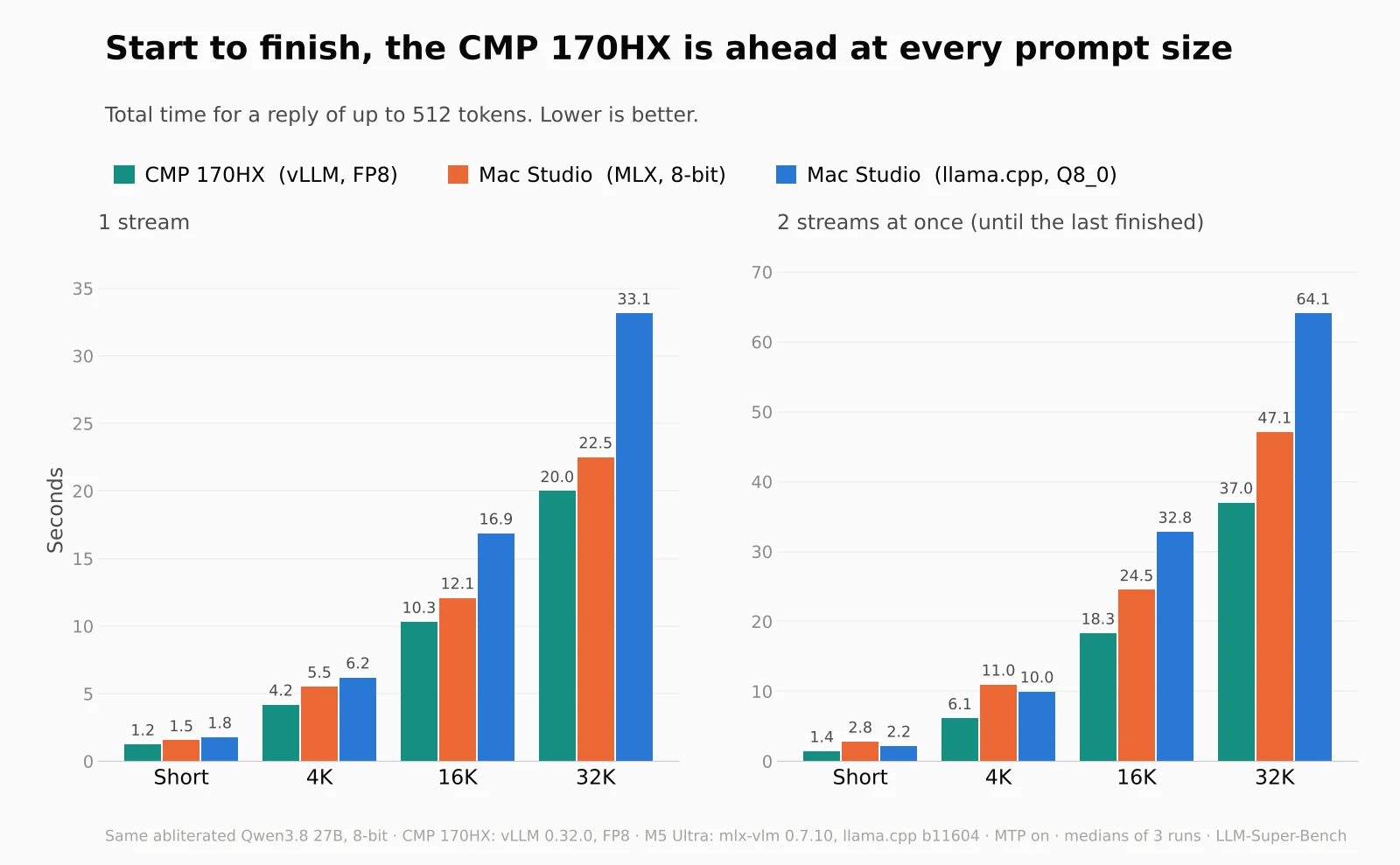
With one or two users, the CMP 170HX on vLLM finished every reply 11 to 49% sooner than the Mac Studio on MLX, and 30 to 44% sooner than the Mac on llama.cpp. With short prompts it kept scaling to eight users at once (438 tokens per second in total), which neither Mac engine came close to. The Mac still has things the card doesn't, mostly memory, and the CMP has one clear weak spot: many long prompts at once.
Why a new model
When the CMP first moved to vLLM it was serving a 4-bit AWQ build, while the Mac was still on the 8-bit Q8_0 GGUF of Huihui's abliterated Qwen3.8 27B. That's not a fair race. I wanted the CMP to run the same model as the Mac, at 8 bits, with image input like the old llama.cpp setup.
The cleanest way to get there was a model family that ships every format I needed from the same weights: orcarouter/Qwen3.8-27B-Uncensored. It has an FP8 build for vLLM, an 8-bit MLX build with an MTP drafter, and a Q8_0 GGUF with its vision projector for llama.cpp. All three keep the vision encoder, so image prompts work as they did on the old llama.cpp setup. Both machines now run it.
The setup
| CMP 170HX | Mac Studio, MLX | Mac Studio, llama.cpp | |
|---|---|---|---|
| Hardware | 1× CMP 170HX, 64 GB, in an Ubuntu VM | M5 Ultra, 256 GB | M5 Ultra, 256 GB |
| Engine | vLLM 0.32.0 | mlx-vlm 0.7.10 | llama.cpp b11604 |
| Weights | FP8 (8-bit) | MLX 8-bit | Q8_0 GGUF |
| Speculative drafting | MTP, 3 tokens | MTP drafter, block size 3 | MTP, draft length 2 |
| Requests at once | 8 | 2 | 2 slots |
| Context | 131,072 | model default | 131,072 per slot |
The speed numbers come from LLM-Super-Bench, run from a separate Mac Studio on the network: prompt sizes Short, 4K, 16K and 32K tokens, 1 and 2 streams at once, 3 repeats per cell, a warm-up thrown away, and the median reported. Replies were capped at 512 tokens, thinking was off and temperature was 0 on every server. The two Mac engines were swept one after the other, never at the same time.
The CMP card has no FP8 hardware, so vLLM runs the FP8 build as weight-only FP8 through its Marlin kernels: the weights are stored in 8 bits and the math is done in 16. The KV cache is BF16.
What I got wrong first
Mismatched builds. My first vLLM numbers came from a 4-bit AWQ build, compared against an 8-bit GGUF. Any speed claim from that pairing mixes up the engine, the quantization and the model. That's why I switched both machines to one model family before running anything I'd publish.
mlx-vlm wants the exact model path. llama.cpp and vLLM answer to whatever name you give them (or a served name). mlx-vlm treats the model field as the model to load, so a request with a short name made it unload the running model and fail with a 404. Every request to it now carries the full path it was started with.
4-bit vs 8-bit on the CMP
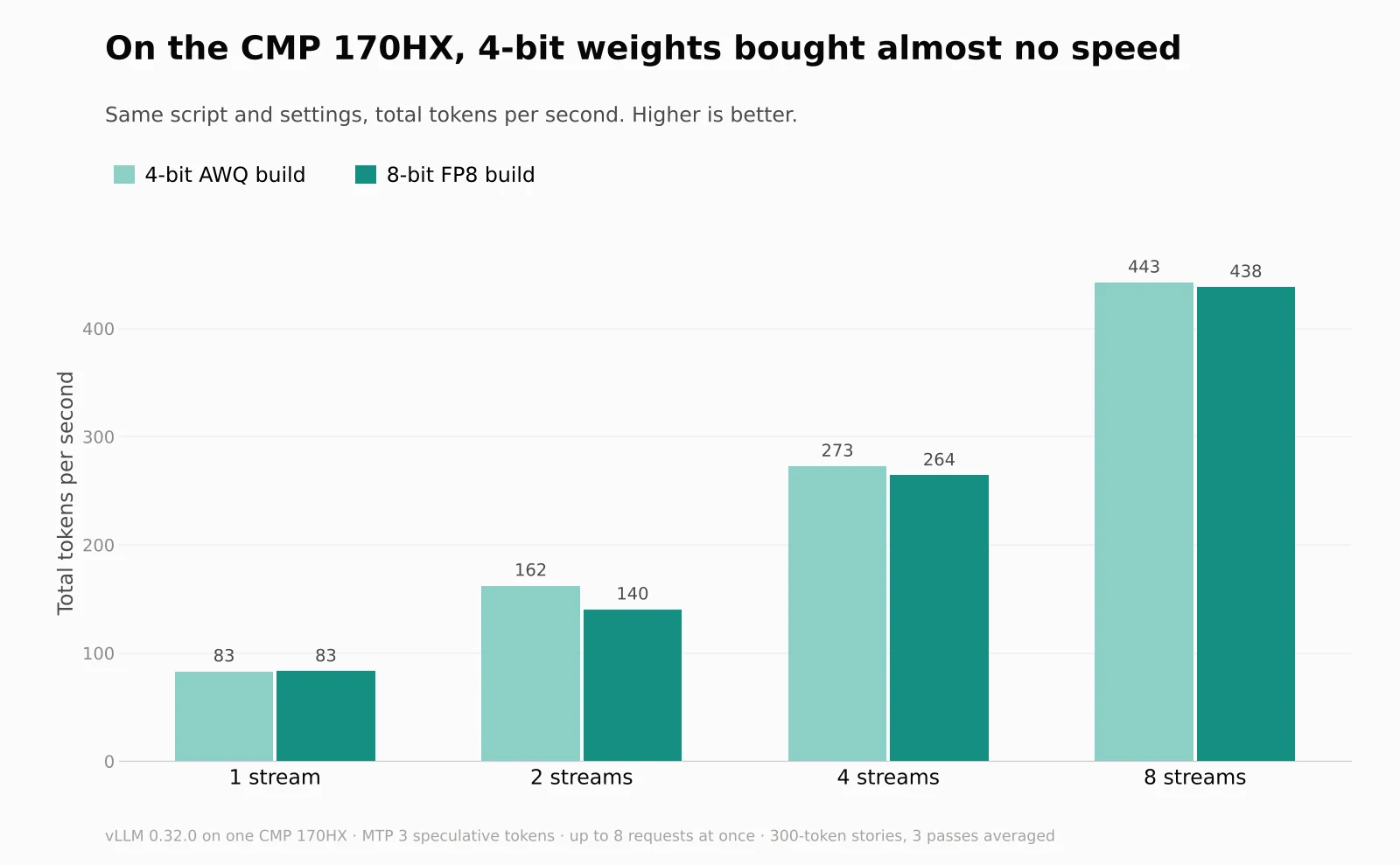
I expected the 4-bit build to be clearly faster, since it reads half as many bytes per token. It wasn't. With the same script and settings the two were tied with one request (83.1 against 83.2 tokens per second) and within 1% at eight (442.6 against 438.4). AWQ was ahead at two requests, 162 against 140. MTP accepted about the same share of drafted tokens on both (41.5% and 42.7%). I haven't dug into why the smaller weights bought so little, but on this card the 8-bit build costs almost nothing in speed, and it's the one that matches the Mac.
Results
Start to finish
| Prompt | CMP, vLLM | Mac, MLX | Mac, llama.cpp | CMP vs MLX |
|---|---|---|---|---|
| Short | 1.2 s / 1.4 s | 1.5 s / 2.8 s | 1.8 s / 2.2 s | 19% / 49% sooner |
| 4K | 4.2 s / 6.1 s | 5.5 s / 11.0 s | 6.2 s / 10.0 s | 24% / 44% sooner |
| 16K | 10.3 s / 18.3 s | 12.1 s / 24.5 s | 16.9 s / 32.8 s | 15% / 25% sooner |
| 32K | 20.0 s / 37.0 s | 22.5 s / 47.1 s | 33.1 s / 64.1 s | 11% / 21% sooner |
Each cell is one stream / two streams, timed until the last reply finished. The CMP was first in every cell. Its lead over MLX is largest with two users on short prompts, and smallest with one user on a 32K prompt, where both machines spend most of the time reading.
Reading the prompt
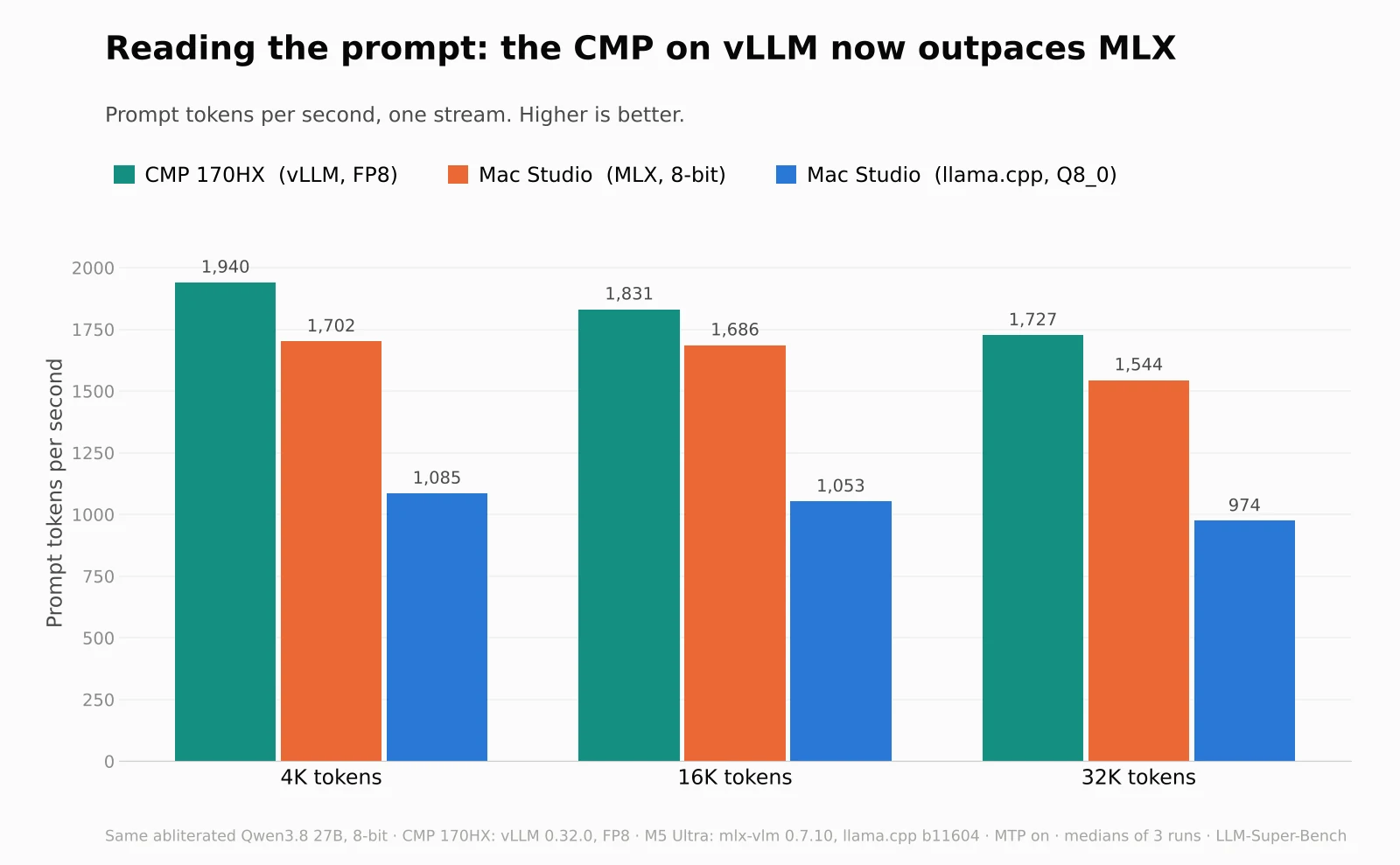
This is the biggest change from the Oct 21 post. On llama.cpp the CMP read prompts at about 814 tokens per second. On vLLM it reads 1,727 to 1,940, about 9 to 14% faster than MLX on the M5 Ultra and about 1.8 times llama.cpp on the same Mac.
The Mac's own numbers repeat what I found on Oct 25 with the Huihui model: MLX reads about 1.6 times as fast as llama.cpp (1,702 against 1,085 at 4K, 1,544 against 974 at 32K).
Writing speed, one user
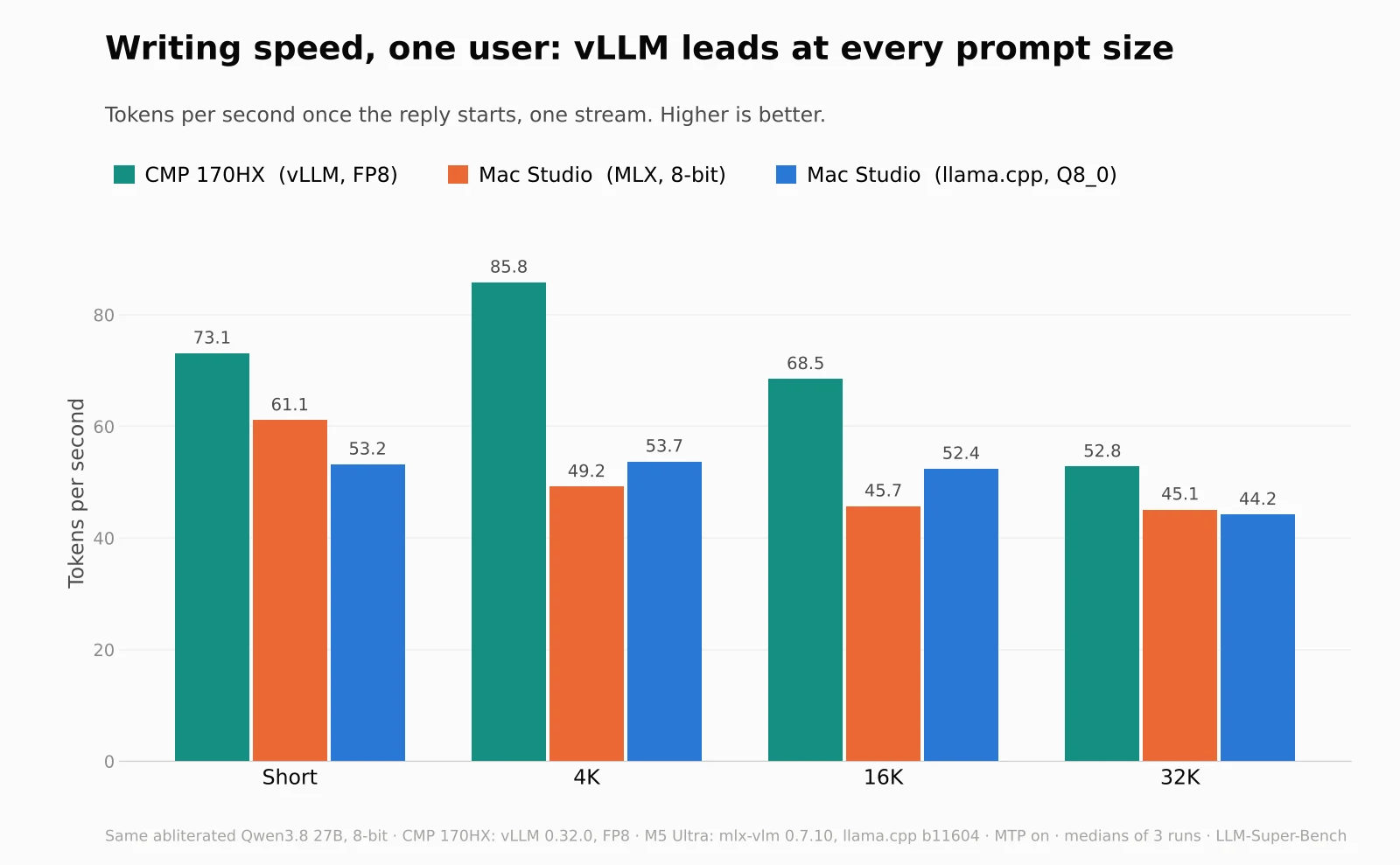
Once the reply starts, vLLM writes 53 to 86 tokens per second, against 45 to 61 for MLX and 44 to 54 for llama.cpp. On llama.cpp the CMP managed about 56. With MTP drafting the speed depends on how predictable the text is, which is why the 4K row is faster than the short one.
Time to the first word follows the prompt reading speed: with one user the CMP starts answering a 32K prompt in 16.7 seconds, against 18.7 for MLX and 29.6 for llama.cpp.
Two users at once
| Prompt | CMP, vLLM | Mac, MLX | Mac, llama.cpp |
|---|---|---|---|
| Short | 70.0 tok/s | 33.6 tok/s | 44.3 tok/s |
| 4K | 80.4 tok/s | 24.6 tok/s | 45.0 tok/s |
| 16K | 41.3 tok/s | 44.4 tok/s | 26.7 tok/s |
| 32K | 30.5 tok/s | 39.0 tok/s | 21.4 tok/s |
Per-stream writing speed with two requests. On short prompts vLLM barely slows down. With long prompts MLX writes a little faster per stream than vLLM, but vLLM still finishes first because it reads the prompts sooner. My guess is that vLLM interleaves the second request's prompt reading with the first one's writing, which slows the writing; I haven't tested that.
Many users at once
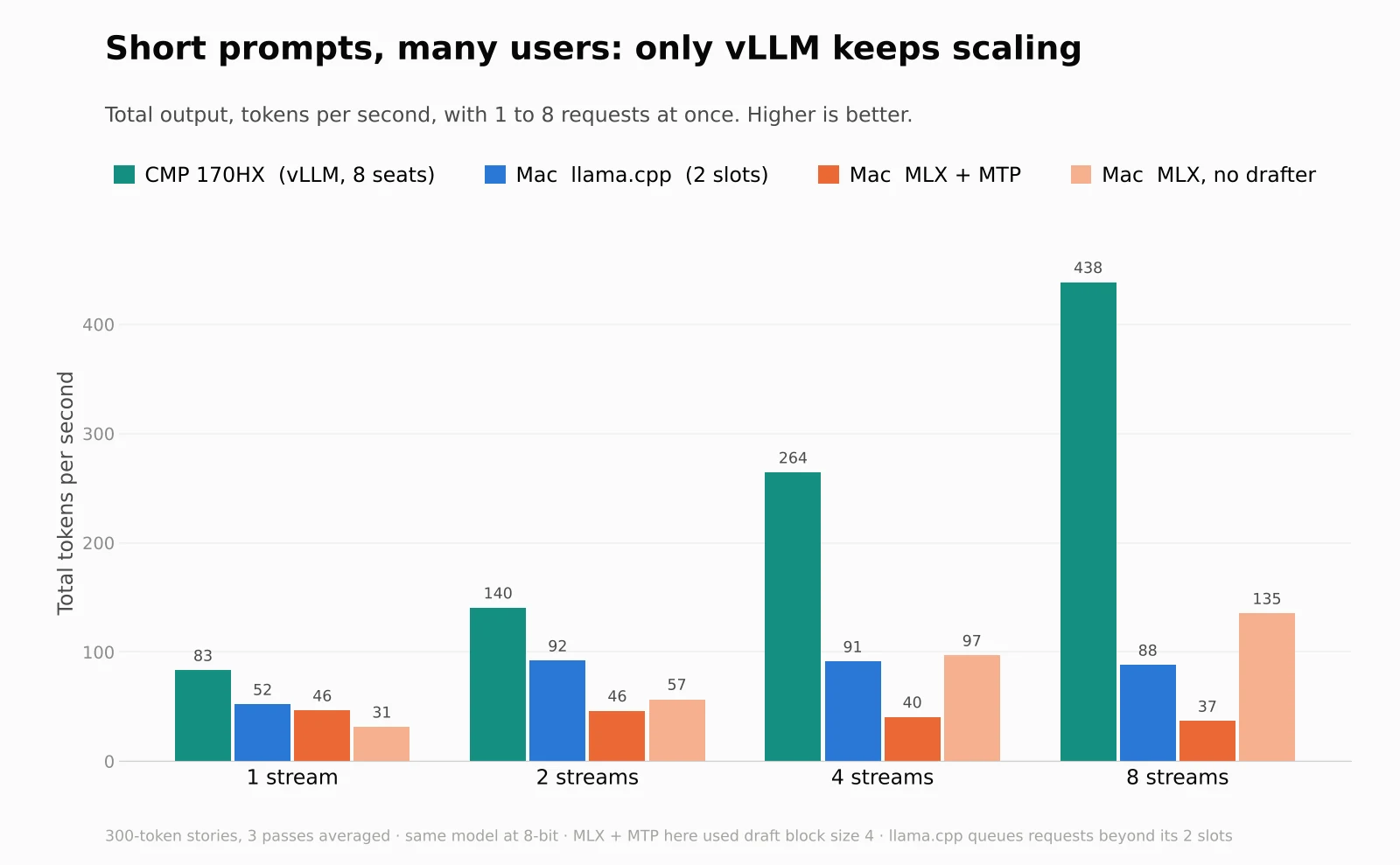
The sweep stops at two streams because both Mac servers are set to two seats. To see what happens beyond that I ran a simpler batch test on each server: 1 to 8 requests for a 300-token story, three passes averaged.
- vLLM keeps scaling: 83 tokens per second with one request, 264 with four and 438 with eight.
- llama.cpp levels off at about 90 from two requests on, because it has two slots and queues the rest.
- MLX with the MTP drafter stays flat, and even slows: 46 tokens per second with one request, 37 with eight.
- MLX without a drafter does scale, from 31 to 135, but it starts much slower for a single user.
The MLX result has a clear cause in mlx-vlm's code. When it batches speculative drafting for Qwen3.x models, every request in the batch advances by the smallest number of drafted tokens any of them accepted. One request that rejects its draft holds back all the others, so more users mostly means more waiting. The code says why: the batch cache can't track different lengths per request without attending to empty keys (issue #1962). That's a deliberate correctness fix, not a bug in my setup, and it explains the slowdown I saw with two users on Oct 25.
Where the CMP slows down
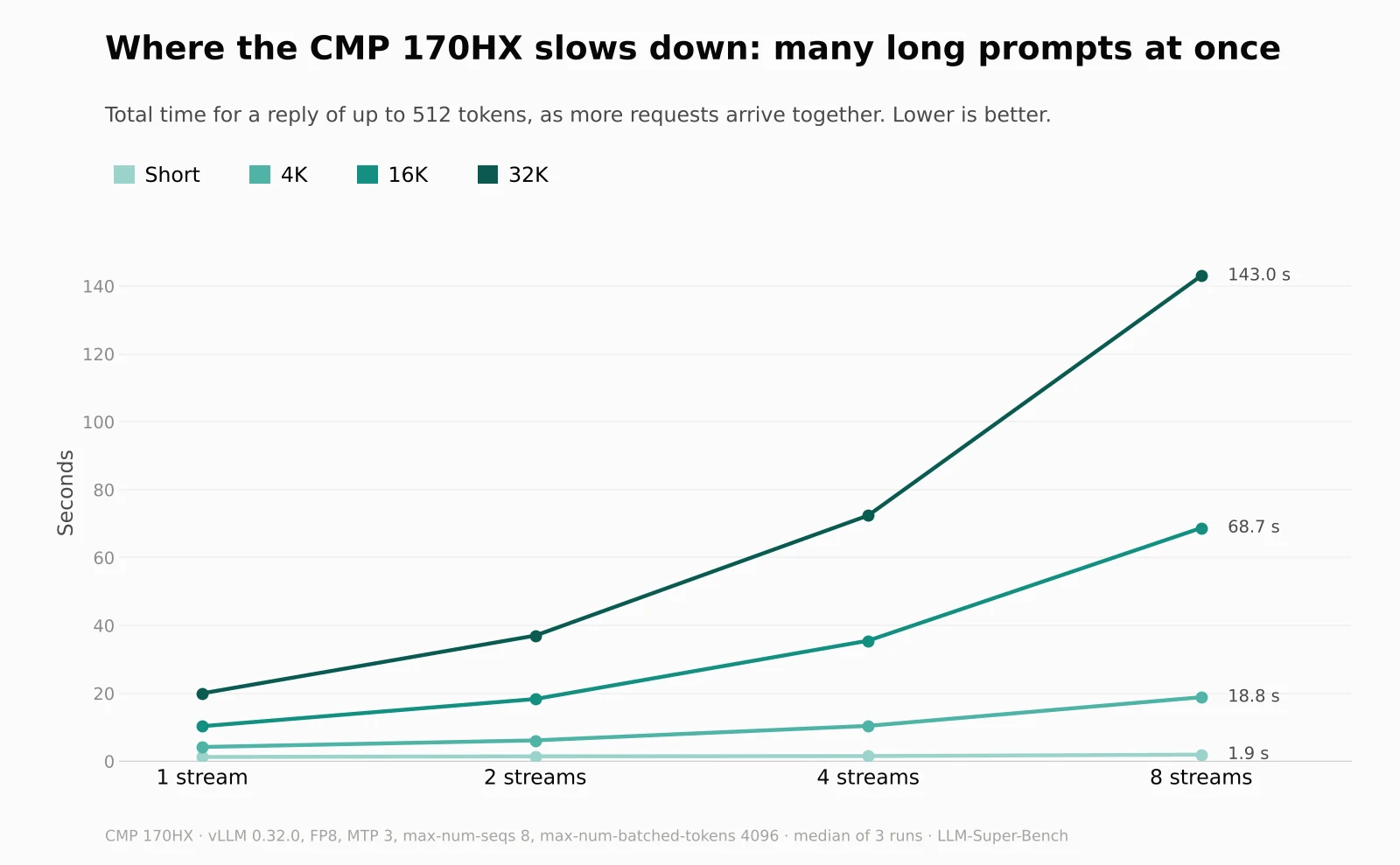
Short prompts barely notice a crowd: 1.2 seconds with one request, 1.9 with eight. Long prompts are a different story. Eight 32K requests took 143 seconds to finish, and the last one waited 80 seconds for its first word.
That's close to what the reading speed alone predicts. Eight 32K prompts are about 262,000 tokens, and at about 1,800 tokens per second that takes around 145 seconds. The same sum gives about 73 seconds for eight 16K prompts (measured: 69) and 18 for eight 4K prompts (measured: 19). So the card is limited by how fast it reads, not by the number of seats. I left max-num-batched-tokens at 4096 and haven't tested larger values, but the arithmetic suggests they wouldn't change much.
Where each machine fits now
- The CMP 170HX on vLLM is now the default server: chat, agents, and several people at once, at any prompt size up to its 131K context. Expect a long wait only when several long documents arrive together.
- The Mac Studio moved from llama.cpp to MLX, because MLX reads long prompts about 1.6 times as fast. I kept it at two seats with the MTP drafter: more seats wouldn't help while the drafter holds the batch back, and dropping the drafter would make it slower for one user.
- The Mac is still the one with memory. 256 GB against the card's 64 GB, so it's where bigger models and longer contexts go. llama.cpp stays installed on it, switched off, in case I need it.
On cost, the Oct 21 post has the prices: about $2,500 for a CMP 170HX card against $6,799 for the same Mac chip with 96 GB, as of Oct 21. Back then the Mac's extra cost bought about 1.55 times the performance. With vLLM on the card, that advantage is gone for this model, though the card still needs a host system around it that I haven't priced.
Caveats
- One model, one day, 3 runs per cell. The runs agreed closely, but it's not a survey of models.
- FP8, MLX 8-bit and Q8_0 are three different 8-bit formats of the same weights, not identical files.
- I measured speed only. I haven't re-run the quality tests from the Oct 24 post on these builds.
- The CMP runs in a VM with the card passed through, as in the Oct 21 post. Bare metal might be a little faster.
- The sweep ran over the network from a separate machine. The batch test ran on each server itself, so its numbers aren't directly comparable with the sweep's.
- In the batch test, MLX with MTP used a draft block size of 4. The sweep used 3, which looked faster in a single-request test (about 61 against 46 tokens per second), but those came from different scripts, so treat that as provisional.
- I didn't measure power or memory use, and I didn't test thinking mode.
Reproduce it
The CMP's vLLM server, with the FP8 build downloaded to a local folder:
vllm serve $MODEL_DIR/orcarouter-Qwen3.8-27B-Uncensored-FP8 \
  --served-model-name qwen3.8-27b \
  --max-model-len 131072 --max-num-seqs 8 --max-num-batched-tokens 4096 \
  --speculative-config '{"method":"mtp","num_speculative_tokens":3}' \
  --host 0.0.0.0 --port 8000
The Mac's MLX server:
mlx_vlm.server \
  --model ~/models/orcarouter-Qwen3.8-27B-Uncensored-MLX/8-bit \
  --draft-model ~/models/orcarouter-Qwen3.8-27B-Uncensored-MLX/mtp \
  --draft-kind mtp --draft-block-size 3 --max-num-seqs 2 \
  --host 0.0.0.0 --port 8000
Then the same sweep against each machine:
bun run sweep --machines "CMP vLLM" --sizes short,4k,16k,32k --streams 1,2 --repeats 3 --temperature 0
bun run sweep --machines "Studio MLX" --sizes short,4k,16k,32k --streams 1,2 --repeats 3 --temperature 0
LLM-Super-Bench now recognises mlx-vlm and mlx-lm, and records the sampling settings with every result. Add the CMP with --streams 1,2,4,8 to see the long-prompt slowdown above.
Related: Mac Studio vs. CMP 170HX: Same 27B Model, Same Settings · llama.cpp vs MLX on an M5 Ultra Mac Studio · Race Your Local AI Machines and Trust the Numbers.